Archives For Tag 'browser'Archives For Tag 'browser' Home » Blog » Tag » browser
You are browsing lesterchan.net blog archives page by tag 'browser'.
Wednesday, 8th February 2012Wednesday, 8th February 2012
Posted by Lester Chan at 08:37 in Software

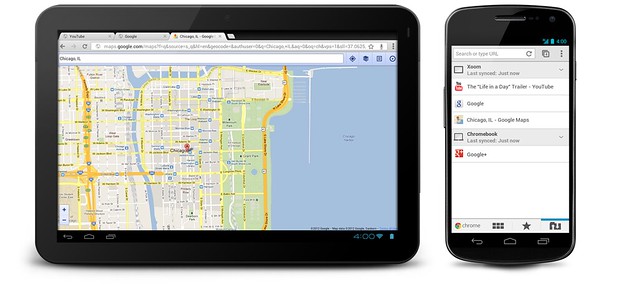
Google Chrome for Android (beta) is now available in the Android Market Place. The sad part is that it requires you to Android 4.0 Ice Cream Sandwich phone or tablet to install it!

Engadget has their hands-on on with Google Chrome on Android! Check it out!

Google Chrome For Android

Introduction
In 2008, we launched Google Chrome to help make the web better. We’re excited that millions of people around the world use Chrome as their primary browser and we want to keep improving that experience. Today, we’re introducing Chrome for Android Beta, which brings many of the things you’ve come to love about Chrome to your Android 4.0 Ice Cream Sandwich phone or tablet. Like the desktop version, Chrome for Android Beta is focused on speed and simplicity, but it also features seamless sign-in and sync so you can take your personalized web browsing experience with you wherever you go, across devices.

Speed
With Chrome for Android, you can search, navigate and browse fast-Chrome fast. You can scroll through web pages as quickly as you can flick your finger. When searching, your top search results are loaded in the background as you type so pages appear instantly. And of course, both search and navigation can all be done quickly from the Chrome omnibox.

Simplicity
Chrome for Android is designed from the ground up for mobile devices. We reimagined tabs so they fit just as naturally on a small-screen phone as they do on a larger screen tablet. You can flip or swipe between an unlimited number of tabs using intuitive gestures, as if you’re holding a deck of cards in the palm of your hands, each one a new window to the web.

One of the biggest pains of mobile browsing is selecting the correct link out of several on a small-screen device. Link Preview does away with hunting and pecking for links on a web page by automatically zooming in on links to make selecting the precise one easier.

And as with Chrome on desktop, we built Chrome for Android with privacy in mind from the beginning, including incognito mode for private browsing and fine-grained privacy options (tap menu icon, ‘Settings’, and then ‘Privacy’).

Sign in
You can now bring your personalized Chrome experience with you to your Android phone or tablet. If you sign in to Chrome on your Android device, you can:

  • View open tabs: Access the tabs you left open on your computer (also signed into Chrome) – picking up exactly where you left off.
  • Get smarter suggestions: If you visit a site often on your computer, you’ll also get an autocomplete suggestion for it on your mobile device, so you can spend less time typing.
  • Sync bookmarks: Conveniently access your favorite sites no matter where you are or which device you’re using.

Availability
Chrome is now available in Beta from Android Market, in select countries and languages for phones and tablets with Android 4.0, Ice Cream Sandwich. We’re eager to hear your feedback. Finally, we look forward to working closely with the developer community to create a better web on a platform that defines mobile.

Google Chrome Blog: Introducing Chrome for Android
Engadget: Chrome Beta for Android hands-on (video)

Tuesday, 15th March 2011Tuesday, 15th March 2011
Posted by Lester Chan at 13:27 in Software

Microsoft has release Internet Explorer 9 aka IE9, and they have a new website for it called, Beauty Of The Web. When I first saw the URL, it looks like some phishing site for me.

AUSTIN, Tex. – March 14, 2011 – Microsoft Corp. today announced the launch of the latest version of the world’s most-used browser with the release of Windows Internet Explorer 9 in 39 languages at an event at the SXSW Interactive conference. Internet Explorer 9 is Microsoft’s most-downloaded browser beta of all time, with more than 40 million downloads, and it has already has gained more than 2 percent usage on Windows 7. Already more than 250 top sites from around the globe are taking advantage of the capabilities in Internet Explorer 9 to deliver differentiated experiences to their customers, with many featured on http://www.BeautyoftheWeb.com. Together, these partners reach more than 1 billion active Internet users on the Web.

Top Sites and Designers Take Advantage of Internet Explorer
Internet Explorer 9 is designed to bring sites front and center through Windows 7, enabling a more immersive, more beautiful Web experience. Features such as Pinned Sites and Jump List enable people to put their websites directly on the Windows 7 Taskbar, as though they were native applications, and then to quickly and easily perform tasks related to those websites, such as check their inboxes, change the music station, accept friend invitations or see breaking news.

Fast Is Now Beautiful: Internet Explorer 9 With Hardware Acceleration
The new version of Internet Explorer takes advantage of the power of modern Windows PC hardware to improve all-around Web browsing performance. It is the only browser with hardware-accelerated HTML5 spanning all graphics, text, audio and video. Internet Explorer 9 harnesses the power of the Graphics Processing Unit (GPU), unlocking 90 percent of the PC’s power that went previously untapped by Web browsers.

Improving Privacy and Security Online
Because the Web is increasingly less secure and private, Internet Explorer 9 is designed to be a trusted browser because it contains a robust set of built-in security, privacy and reliability technologies that keep customers safer online.

Press Release: Microsoft Announces Global Availability of Internet Explorer 9

Direct Download Links From Microsoft:

Wednesday, 25th February 2009Wednesday, 25th February 2009
Posted by Lester Chan at 01:57 in Press Release, Software

Apple Announces Safari 4. Safari 4 is built on the world’s most advanced browser technologies including the new Nitro JavaScript engine that executes JavaScript up to 30 times faster than IE 7 and more than three times faster than Firefox 3. Safari quickly loads HTML web pages three times faster than IE 7 and almost three times faster than Firefox 3.

Apple is leading the industry in defining and implementing innovative web standards such as HTML 5 and CSS 3 for an entirely new class of web applications that feature rich media, graphics and fonts. Safari 4 includes HTML 5 support for offline technologies so web-based applications can store information locally without an Internet connection, and is the first browser to support advanced CSS Effects that enable highly polished web graphics using reflections, gradients and precision masks. Safari 4 is the first browser to pass the Web Standards Project’s Acid3 test, which examines how well a browser adheres to CSS, JavaScript, XML and SVG web standards that are specifically designed for dynamic web applications.
New Features In Safari 4

  • Top Sites, a display of frequently visited pages in a stunning wall of previews so users can jump to their favorite sites with a single click
  • Full History Search, where users search through titles, web addresses and the complete text of recently viewed pages to easily return to sites they’ve seen before
  • Cover Flow, to make searching web history or bookmarks as fun and easy as paging through album art in iTunes
  • Tabs on Top, for better tabbed browsing with easy drag-and-drop tab management tools and an intuitive button for opening new ones
  • Smart Address Field, that automatically completes web addresses by displaying an easy-to-read list of suggestions from Top Sites, bookmarks and browsing history
  • Smart Search Field, where users fine-tune searches with recommendations from Google Suggest or a list of recent searches
  • Full Page Zoom, for a closer look at any website without degrading the quality of the site’s layout and text
  • built-in web developer tools to debug, tweak and optimize a website for peak performance and compatibility
  • A new Windows-native look in Safari for Windows, that uses standard Windows font rendering and native title bar, borders and toolbars so Safari fits the look and feel of other Windows XP and Windows Vista applications

Press Release: Apple Announces Safari 4 – The World’s Fastest & Most Innovative Browser
Official Site: Safari Beta 4
Download: Safari Beta 4

Tuesday, 2nd September 2008Tuesday, 2nd September 2008
Posted by Lester Chan at 09:10 in Software

Google has hoped on to the web browser bandwagon. Google Chrome is an open source web browser developed by Google using the WebKit rendering engine.

  • An address bar with auto-completion features called “omnibox.”
  • The V8 JavaScript Virtual Machine.
  • A privacy mode.
  • Web applications can be launched in their own browser window without an address bar and toolbar.
  • Chrome includes an automatically updated phishing and malware blacklist using the Google Safe Browsing API.
  • Uses the WebKit Rendering Engine.
  • Puts individual tabs and plug-ins into separate processes.
  • Integration of Gears.

The beta should be available tomorrow (Singapore time). Wonder how well it will stand against Mozilla Firefox.

Source: Google Blog: A fresh take on the browser
Taken From: Wikipedia: Google Chrome
More Information: Google Chrome, Google’s Browser Project