Archives For Tag 'Chrome'Archives For Tag 'Chrome' Home » Blog » Tag » Chrome
You are browsing lesterchan.net blog archives page by tag 'Chrome'.
Wednesday, 8th February 2012Wednesday, 8th February 2012 (4 days ago)
Posted by Lester Chan at 08:37 in Software

Google Chrome for Android (beta) is now available in the Android Market Place. The sad part is that it requires you to Android 4.0 Ice Cream Sandwich phone or tablet to install it!

Engadget has their hands-on on with Google Chrome on Android! Check it out!

Google Chrome For Android

Introduction
In 2008, we launched Google Chrome to help make the web better. We’re excited that millions of people around the world use Chrome as their primary browser and we want to keep improving that experience. Today, we’re introducing Chrome for Android Beta, which brings many of the things you’ve come to love about Chrome to your Android 4.0 Ice Cream Sandwich phone or tablet. Like the desktop version, Chrome for Android Beta is focused on speed and simplicity, but it also features seamless sign-in and sync so you can take your personalized web browsing experience with you wherever you go, across devices.

Speed
With Chrome for Android, you can search, navigate and browse fast-Chrome fast. You can scroll through web pages as quickly as you can flick your finger. When searching, your top search results are loaded in the background as you type so pages appear instantly. And of course, both search and navigation can all be done quickly from the Chrome omnibox.

Simplicity
Chrome for Android is designed from the ground up for mobile devices. We reimagined tabs so they fit just as naturally on a small-screen phone as they do on a larger screen tablet. You can flip or swipe between an unlimited number of tabs using intuitive gestures, as if you’re holding a deck of cards in the palm of your hands, each one a new window to the web.

One of the biggest pains of mobile browsing is selecting the correct link out of several on a small-screen device. Link Preview does away with hunting and pecking for links on a web page by automatically zooming in on links to make selecting the precise one easier.

And as with Chrome on desktop, we built Chrome for Android with privacy in mind from the beginning, including incognito mode for private browsing and fine-grained privacy options (tap menu icon, ‘Settings’, and then ‘Privacy’).

Sign in
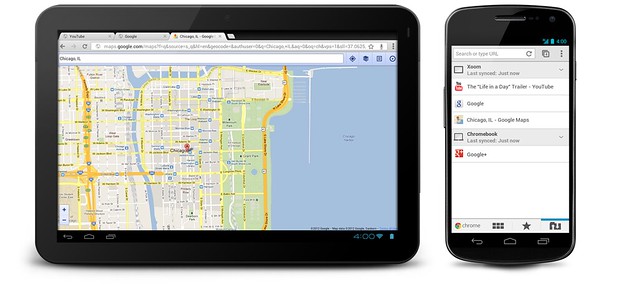
You can now bring your personalized Chrome experience with you to your Android phone or tablet. If you sign in to Chrome on your Android device, you can:

  • View open tabs: Access the tabs you left open on your computer (also signed into Chrome) – picking up exactly where you left off.
  • Get smarter suggestions: If you visit a site often on your computer, you’ll also get an autocomplete suggestion for it on your mobile device, so you can spend less time typing.
  • Sync bookmarks: Conveniently access your favorite sites no matter where you are or which device you’re using.

Availability
Chrome is now available in Beta from Android Market, in select countries and languages for phones and tablets with Android 4.0, Ice Cream Sandwich. We’re eager to hear your feedback. Finally, we look forward to working closely with the developer community to create a better web on a platform that defines mobile.

Google Chrome Blog: Introducing Chrome for Android
Engadget: Chrome Beta for Android hands-on (video)

Wednesday, 8th July 2009Wednesday, 8th July 2009
Posted by Lester Chan at 14:56 in Software

Google announces Google Chrome OS! But it would not be out till the 2nd half of next year. Looks like it will give Microsoft a run for its money for its Windows 7 Starter Edition targeting at netbooks.

Google Chrome OS is an open source, lightweight operating system that will initially be targeted at netbooks. Later this year we will open-source its code, and netbooks running Google Chrome OS will be available for consumers in the second half of 2010. Because we’re already talking to partners about the project, and we’ll soon be working with the open source community, we wanted to share our vision now so everyone understands what we are trying to achieve.
Speed, simplicity and security are the key aspects of Google Chrome OS. We’re designing the OS to be fast and lightweight, to start up and get you onto the web in a few seconds. The user interface is minimal to stay out of your way, and most of the user experience takes place on the web. And as we did for the Google Chrome browser, we are going back to the basics and completely redesigning the underlying security architecture of the OS so that users don’t have to deal with viruses, malware and security updates. It should just work.

Google Chrome OS will run on both x86 as well as ARM chips and we are working with multiple OEMs to bring a number of netbooks to market next year. The software architecture is simple — Google Chrome running within a new windowing system on top of a Linux kernel. For application developers, the web is the platform. All web-based applications will automatically work and new applications can be written using your favorite web technologies. And of course, these apps will run not only on Google Chrome OS, but on any standards-based browser on Windows, Mac and Linux thereby giving developers the largest user base of any platform.

Read: Introducing the Google Chrome OS