Archives For Tag 'Intel'Archives For Tag 'Intel' Home » Blog » Tag » Intel
You are browsing lesterchan.net blog archives page by tag 'Intel'.
Thursday, 10th June 2010Thursday, 10th June 2010
Posted by Lester Chan at 00:00 in Event, Hardware

Was invited to Intel exclusive blogger event on Monday, 7th June 2010, at Starhub center which is where the Intel office is. My first impression of the office is that they got tall cubicles!

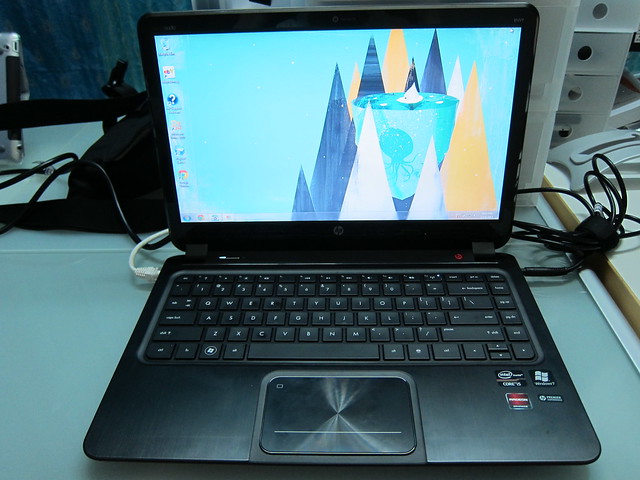
We are introduce to the latest Intel technology, SSD, Wireless Display, Project “Tangent Bay”, Light Peak, Super Thin Laptops and Intel’s AppStore!

SSD


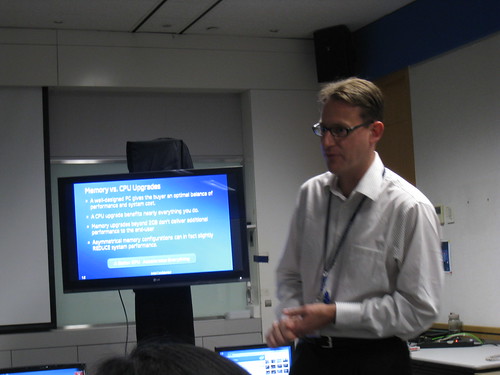
Memory vs CPU Upgrades

The bottle neck of our computer is no longer our ram or graphics card and even processer, but our hard disk drive. A computer with SSD with just 3GB or ram will outperform a computer with 7200rpm HDD with 6GB of ram. Not many applications make use of the extra free ram, not in the eyes of normal consumer, they don’t run virtualization or even Adobe Premium Pro. Anything more than 4GB of ram will not bring significant improvement speed, the money will be put to better use in SSD.

I always wanted a SSD, regretted not getting it in Taiwan as it is cheaper by about SGD$70 over there at Taiwan’s Guanghua Computer Center. 300GB to 600GB SSD is expected to be release before the end of the year and that will push down the prices for 40GB/60GB/80GB SSD.

I have the misconception of SSD that once the limited 5 years lifespan is up, I can no longer use the drive and my data is gone. That is not true, you can no longer write to the drive, but you still can read from it.

Official Site: Intel SSD

Wireless Display


Netgear Setup Box

I was blown away by the Wireless Display. You just need a small setup box connected to your TV via HDMI and you can stream your laptop screen OTA to the TV! It also streams audio to your TV as well.

It is using 802.11g technology capable of delivering 54Mbps of bandwidth. The secret lies in the Intel Wireless Display built into your laptop where it compresses and encodes the signal and when the signal is sent OTA to the setup box, it gets decoded and decompressed and outputted to your TV!

Netgear is the only maker of the setup box at the moment but more will come soon!

Official Site: Intel Wireless Display

Tangent Bay


Tangent Bay

Tangent Bay is a project by Intel that brings 3 touch screens placed below the screen and above the keyboard. You can drag windows down to these screen even playing a movie there as well. The reason of putting 3 touch screens instead of a single piece is because of cost and availability. It is easier and cheaper to get 3 touch screens the size of a normal smart phone then to make one specially for laptops.

This is coming in Q1 2011.

Gizmodo: Intel’s “Tangent Bay” Laptop Concept Has 3 OLED Multi-Touch Screens Above the Keyboard

Light Peak


Light Peak

We have maxed out the bandwith of copper cables and that is where light comes in. The longest cable length you can go without slowing down the transfer speed with a single USB3 cable is 3m and for USB2 is 2m. For light peak, the limit on the length is limited by transmit power.

I wonder what comes after light?

Intel Research: Light Peak Technology

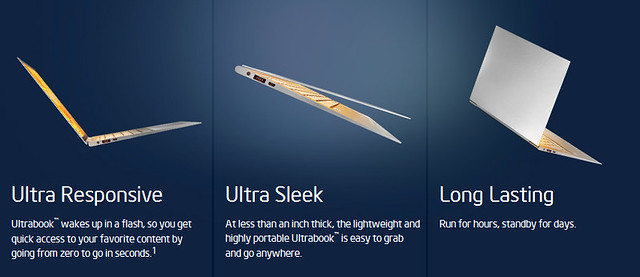
Super Thin Laptops


Dell Adamo

I call this MacBook Air for the masses! The chips are soldered directly on the motherboard and thus reducing heat output and hence reducing the need for fan or a cooling system. It is a reduction of 32% in size.

App Store
Intel also jumped onto the App Store bandwagon with its own App Store called AppUp Center. It features apps for netbook for platforms like Windows, Moblin, Meego. It also allows OEM manufacturers to have a co-branded store front. Intel’s own Moblin will eventually be replace with Meego

Visit: AppUp Center

More Photos

Intel Adverts
We are shown some funny Intel adverts and the people acted in the video are all Intel’s staff! Here is my favourite advert:

YouTube: Intel’s Channel

Thanks to Elvin from Intel for the invite!

Tuesday, 19th January 2010Tuesday, 19th January 2010
Posted by Lester Chan at 17:45 in Event, Hardware


Intel Event At Ben & Jerry’s (Dempsey Village)

Had a great time today at Intel’s event at Ben & Jerry’s at Dempsey Village. Firstly, free flow of Ben & Jerry ice cream (I only ate five scoops and drank a cup of coke float) and secondly was the ride on the Segway! It was my first time riding the Segway. Felt nervous at first because of the phobia of falling down, but after the first two rounds got kinda used to it and it was very fun (I went a total of 4 rounds around the building). If I have some spare cash, I will definitely get one, but it is freaking ex, minimum at least SGD$12K.


My First Attempt At Segway

Intel introduces a range of 32 nanometer processors across the Intel Core i3, Core i5 and Core i7 family, about 29 of them. There are 3 Core strength to these processors:


Intel Turbo Boost Technology

1. Intel Turbo Boost Technology for adaptive performance, and thus smarter computing. Intel Turbo Boost Technology automatically accelerates performance, adjusting to the workload to give users an immediate performance boost when needed.


Intel Hyper-Threading Technology

2. Intel Hyper-Threading Technology, available in Intel Core i7, Core i5 and Core i3 processors, enables smart multi-tasking by allowing each processing core to run multiple “threads,” providing amazing responsiveness and great performance, balanced with industry-leading energy efficiency when processing several tasks simultaneously.


Intel HD Graphics

3. Intel HD Graphics, the processors deliver stunning visuals and smooth high-definition (HD) video playback. It’s also the industry’s first integrated solution to deliver multi-channel Dolby TrueHD and DTS Premium Suite home theater audio. In addition, Intel HD Graphics support mainstream and casual 3-D gaming without the need for an add-in video card, and offer full support for the new Microsoft Windows 7 operating system.


Intel Core Mobile Processor Laptops

Intel Core Mobile Processors

Processor Number Base Clock Speed (GHz) Turbo Frequency (GHz) Cores/Threads Graphics Frequency (MHz) 1 ku Boxed Pricing (USD$)
Intel Core i7-620M 2.66 Up To 3.33 GHz 2/4 500-766 $332
Intel Core i5-540M 2.53 Up To 3.06 GHz 2/4 500-766 $257
Intel Core i5-520M 2.4 Up To 2.93 GHz 2/4 500-766 $225
Intel Core i5-430M 2.26 Up To 2.53 GHz 2/4 500-766 Not listed
Intel Core i3-350M 2.26 n/a 2/4 500-667 Not listed
Intel Core i3-330M 2.13 n/a 2/4 500-667 Not listed
Intel Core i7-640LM 2.13 Up To 2.93 GHz 2/4 266-566 $332
Intel Core i7-620LM 2.0 Up To 2.80 GHz 2/4 266-566 $300
Intel Core i7-640UM 1.2 Up To 2.26 GHz 2/4 166-500 $305
Intel Core i7-620UM 1.06 Up To 2.13 GHz 2/4 166-500 $278
Intel Core i5-520UM 1.06 Up To 1.86 GHz 2/4 166-500 $241


Intel Core Mobile Processor Desktop

Intel Core Desktop Processors

Processor Number Base Clock Speed (GHz) Turbo Frequency (GHz) Cores/Threads Graphics Frequency (MHz) 1 ku Boxed Pricing (USD$)
Intel Core i5-670 3.46 Up To 3.73 GHz 2/4 733 $284
Intel Core i5-661 3.33 Up To 3.60 GHz 2/4 900 $196
Intel Core i5-660 3.33 Up To 3.60 GHz 2/4 733 $196
Intel Core i5-650 3.20 Up To 3.46 GHz 2/4 733 $176
Intel Core i3-540 3.06 n/a 2/4 733 $133
Intel Core i3-530 2.93 n/a 2/4 733 $113


Intel Core Embedded Line-up

Processor Number Base Clock Speed (GHz) Turbo Frequency (GHz) Cores/Threads Thermal Design Power Error Correcting Code 1 ku Pricing (USD$)
Intel Core i7-620M 2.66 Up To 3.33 GHz 2/4 35W No $332
Intel Core i7-610E 2.53 Up To 3.20 GHz 2/4 35W Yes $332
Intel Core i7-620LE 2.0 Up To 2.80 GHz 2/4 25W Yes $300
Intel Core i7-620UE 1.06 Up To 2.13 GHz 2/4 18W Yes $278
Intel Core i5-520M 2.4 Up To 2.93 GHz 2/4 35W No $225
Intel Core i5-520E 2.4 Up To 2.93 GHz 2/4 35W Yes $225
Intel Core i5-660 3.33 Up To 3.60 GHz 2/4 73W Yes $196
Intel Core i3-540 3.06 n/a 2/4 73W Yes $133
Intel Core i7-860 2.8 Up To 3.46 GHz 4/8 95W No $284
Intel Core i5-750 2.66 Up To 3.20 GHz 4/4 95W No $196
Intel Xeon X3450 2.66 Up To 3.20 GHz 4/8 95W Yes $241
Intel Xeon X3430 2.4 Up To 2.80 GHz 4/4 95W Yes $189


Intel Wireless Adapters
Apart from processors, Intel also introduces 4 new wireless adapters which features 802.11n, dual-band and WiMax support.

The Intel Centrino brand now represents Intel’s wireless products, targeting a broader range of users than ever before. Three new Intel Centrino Wireless adapters feature advanced 802.11n multi-stream capabilities and dual-band support for WiFi, offering users up to 8 times greater speed, consistent coverage and reliable connectivity while consuming minimal power.

Intel offers a complete line of high-quality adapters and its integrated WiMAX/WiFi adapter supports 2.3, 2.5 and 3.5GHz WiMAX bands delivering up to 20Mbps on the go.

All the adapters support Intel My WiFi Technology, which allows users to turn their laptop into a virtual hotspot and directly connect wireless devices to their laptop. Remote WiFi client management with Intel Embedded IT and Intel Active Management Technology 6.0 also helps enable remote client management for the enterprise.

Wireless Name Transmit Antennas Receive Antennas Spatial Streams Maximum Throughput Frequency Support
Intel Centrino Wireless-N 1000 1 2 2 300 Mbps 2.4 GHz
Intel Centrino Advanced-N 6200 (New) 2 2 2 300 Mbps 2.4 & 5 GHz
Intel Centrino Ultimate-N 6300 (New) 3 3 3 450 Mbps 2.4 & 5 GHz
Intel Centrino Advanced-N + WiMAX 6250 (New) 2 2 2 300 Mbps Wi-Fi: 2.4 & 5GHz
WiMAX: 2.3, 2.5, 3.5GHz


Press Release Intel Unveils All New 2010 Intel Core™ Processor Family
Facebook Gallery: Intel 2010 Core Processor Family

Tuesday, 18th November 2008Tuesday, 18th November 2008
Posted by Lester Chan at 21:57 in Event, Hardware

Just came back from the launch of Intel Core i7 at Equinox, Swissotel The Stamford. This is the second time I have been to Equinox, the first time was attending OCBC Chinese New Year dinner with my mom.


My Badge

Equinox is located at the 70th floor of Swissotel The Stamford and you can expect the view to be fantastic.


Nice View Of The CBD

The place is pretty small, there were about 10 PCs setup with games running on the Core i7 and it doesn’t lag! Maybe because some of the gaming rig are using Nvidia SLI/ ATI CrossFire graphics card. There is also a demo by an Australian Overclocker which uses liquid nitrogen (he literally brought the whole tank of liquid nitrogen) to overclock the Core i7. He did not show us what clock speed is it running but rather the temperature of the CPU which is about 4deg;

I am very expressed by the speed of the processor, there is a demo between a Core 2 Quad and Core i7 processor base on 3D rendering and video encoding, and the results are impressive. I love the hyper-threading (HT) on the Core i7 which makes your OS recognize it as 8 cores instead of just 4, similar to the technology used in Pentium 4 half a decade ago.


Core i7 Specifications in CPU-Z

There are 3 flavors of the Core i7 available, Core i7-920 running at 2.66GHz, Core i7-940 running at 2.93GHz and Core i7-965 XE running at 3.2Ghz. It is available in Sim Lim Square as of today, they started shipping it 2 weeks ago to retailers at Sim Lim Square but they only can start selling from today onwards.

Prices wise, it is pretty steep, ranging from SGD$919 to SGD$2,176 with motherboard bundle and not forgetting it only support DDR3 RAM (which is expensive now) if I am not wrong.


Core i7 Prices – Click To View Larger Image

You might want to wait till next year for the price to drop before upgrading your computer. It suddenly makes my Core 2 Quad Q9450 very outdated. But I think the next time I change my computer (5 years later in 2013), it should have at least 16 cores and with HT, it will become 32 cores.

I have uploaded the pictures take I took to Facebook, you can check out here.

Wilfrid if you are reading this, thanks for the dinner treat =D

Monday, 11th August 2008Monday, 11th August 2008
Posted by Lester Chan at 12:52 in Hardware, Press Release

Intel has announced the successor to Intel Core 2 Quad (codename Yorkfield) to be Intel Core i7 (codename Nehalem). I suddenly feel that my Q9450 feels old.

          
Intel Core i7 Processor (Left) and Intel Core i7 Processor Extreme Edition (Right)

SANTA CLARA, Calif., Aug. 11, 2008 – Intel Corporation announced today that desktop processors based on the company’s upcoming new microarchitecture (codenamed “Nehalem”) will be formally branded “Intel Core processor.” The first products in this new family of processors, including an “Extreme Edition” version, will carry an “i7″ identifier and will be formally branded as “Intel Core i7 processor.” This is the first of several new identifiers to come as different products launch over the next year.

Products based on the new microarchitecture will deliver high performance and energy efficiency. This “best of both worlds” approach is expected to extend Intel’s processor leadership in future mobile, desktop and server market segments.

Source: Press Release: Next-Generation Intel PC Chips to Carry Intel Core Name

Read: Wikipedia: Intel Core i7