Archives For Tag 'mysql'Archives For Tag 'mysql' Home » Blog » Tag » mysql
You are browsing lesterchan.net blog archives page by tag 'mysql'.
Thursday, 7th April 2011Thursday, 7th April 2011
Posted by Lester Chan at 08:51 in Site

Spend the weekends trying to get Cacti up and running on this VPS. Apparently since this VPS is using WHM on CentOS, there are some packages like Apache, PHP, MYSQL, Perl, Ruby installed directly but not indicated as installed via Yum and hence it is failing dependency check when trying to install rrdtool.

What is Cacti

Cacti is a complete network graphing solution designed to harness the power of RRDTool’s data storage and graphing functionality. Cacti provides a fast poller, advanced graph, multiple data acquisition methods, and user management features out of the box. All of this is wrapped in an intuitive, easy to use interface that makes sense for LAN-sized installation templating s up to complex networks with hundreds of devices.

What is RRDtool

RRDtool is the OpenSource industry standard, high performance data logging and graphing system for time series data. RRDtool can be easily integrated in shell scripts, perl, python, ruby, lua or tcl applications.

Spent almost the whole day trying to get that installed but to no avail. Found this tutorial, Install RRDTool on Red Hat Enterprise Linux, followed it and I managed to get rrdtool up and running.

Next was the easy step which is to download Cacti and upload it to this server. PHP and MYSQL is needed to run Cacti and hence you need to create a MYSQL database and account for Cacti.

Once that is done, remember to import the existing database data/structure in cacti.sql into the database, if not you will get segfault errors when accessing your Cacti.

You will also need to create a cron job that runs once every 5 minutes to populate contents for Cacti, refer to Install and Configure Cacti.

Now what you need are templates/graphs to monitor your Apache, MYSQL, Memcached and even your server. For Apache and MYSQL you can use mysql-cacti-templates, even for Memcached, you can use that, but personally I am using memcached Cacti Template.

Remember that each scripts you download requires configuration in the script itself.

  • For memcached, you need to enter your memcached IP and Port.
  • For Apache, you need to have SSH account setup and mod_status compiled and ExtendedStatus set to On. By default, mod_status is compiled in all WHM installations.
  • For MYSQL, you need to enter your MYSQL credentials.

Everything is up and running, now it is the time to create a custom graph if you want, you can take a look at Making Your Scripts Work With Cacti.

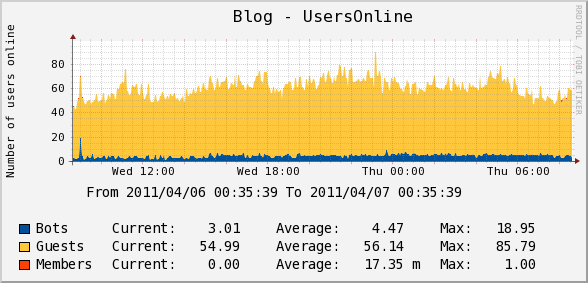
I created a custom script to pull the number of usersonline on my site via my WordPress WP-UserOnline plugin and populate it in Cacti.

If you are using iPhone/iPad, there is also an app for it called iCacti (Universal App) which cost USD$3.99. I bought it instantly when I discovered that there is an app for Cacti. Works well with https/http auth and normal login.


Blog – UsersOnline (Custom)


Server – Load Average


Apache – Requests


MYSQL – Command Counters


Memcached – Requests Per Second

Wednesday, 8th April 2009Wednesday, 8th April 2009
Posted by Lester Chan at 02:31 in Site

I am hosting lesterchan.net on ex-FRRO shared/reseller server, now it can be considered a dedicated server that I am sharing together with Michael Feng. I have also a shared hosting account with a dedicated IP sponsored by Vodien Internet Solutions (which has excellent and fast customer service by the way). The FRRO server is using DirectAdmin while Vodien uses cPanel.

I have been Googling for days to find a way to replicate my files and databases from DirectAdmin (FRRO) To cPanel (Vodien) on a daily basis, but unfortunately I can’t find a way to do it. So I decided to think out of the box/back to basic and not do use DirectAdmin to cPanel but rather use rsync and mysqldump from one server to another.
I stumbled upon this article by HowtoForge entitled, Mirror Your Web Site With rsync. I followed the tutorial closely and it works perfectly, my files are mirrored from FRRO to Vodien everyday at midnight.

Within the same article, there are links to How To Set Up Database Replication In MySQL and How To Set Up A Load-Balanced MySQL Cluster. But unfortunately these tutorials requires root access to both servers which I do not have.

I thought of another idea which is to use mysqldump (at FRRO) to backup the database to a folder which will be included in the mirroring using rsync. After the rsync runs, the backup file should already be copied over to Vodien. Over at Vodien, I will use mysql to restore the database. This is quite a tiring process.

23:50 – Run mysqldump at FRRO (backup database)
00:00 – Run rsync at Vodien (mirror files)
00:30 – Run mysql at Vodien (restore database)

Notice that I give the cron jobs a buffer of 10 minutes for the backup database to happen before rsync and 30 minutes for the rsync to takes place before restoring the database.

Still not satisfied with the efficiency, I continued Googling for better solutions and I found an article by DevShed entitled, Backing Up and Restoring Your MySQL Database, in particular this paragraph:

Moving Data Directly Between Databases
How would you like to replicate your present database to a new location? When you are shifting web hosts or database servers, you can directly copy data to the new database without having to create a database backup on your machine and restoring the same on the new server. mysql allows you to connect to a remote database server to run sql commands. Using this feature, we can pipe the output from mysqldump and ask mysql to connect to the remote database server to populate the new database. Let’s say we want to recreate the Customers database on a new database server located at 202.32.12.32, we can run the following set of commands to replicate the present database at the new server

mysqldump -u sadmin -p pass21 Customers | mysql --host=202.32.12.32 -C Customers

And that is when I realized I can pipe the output of mysqldump of FRRO to the MYSQL server of Vodien. But before that can take place, you need to set the allowed host in Remote MYSQL in cPanel. In this case, I added the IP of FRRO as well as the hostname to the allowed host in Vodien’s cPanel.

I tested the MYSQL piping and it works perfectly! So now the cron jobs are reduced to just two.

00:00 – Run rsync at Vodien (mirror files)
00:10 – Run mysqldump at FRRO (pipe MYSQL database)

Here is my rsync cron job command that will run at midnight everyday:

/usr/bin/rsync -avz --delete -e "ssh -i /path/to/key/mirror-rsync-key" username@domain.com:/home/username/domain.com/public_html/ /home/username/public_html/

Here is my mysqldump cron job command that will run at 00:10 everyday:

/usr/bin/mysqldump --user="mysql_username" --password="mysql_password" --opt --all-databases | /usr/bin/mysql --host=192.168.1.1 --user="mysql_username" --password="mysql_password"

*UPDATE*

Uzyn suggested a more secured and faster way of “piping” the MYSQL database:

/usr/bin/mysqldump | gzip > /path/to/d.gz; ssh user@mirror "scp user@primary:/path/to/d.gz; mysql < gunzip -c d.gz"

What this command does is basically, gzip your database, ssh/scp it over to the backup server and gunzip it from there. It is quite similar to my rsync method mentioned previously.