Archives For Tag 'Prowl'Archives For Tag 'Prowl' Home » Blog » Tag » Prowl
You are browsing lesterchan.net blog archives page by tag 'Prowl'.
Friday, 28th August 2009Friday, 28th August 2009
Posted by Lester Chan at 11:37 in Blog

I have been addicted to Apple’s Push Notification Service ever since I bought Prowl. There are endless possibilities on what you can do with Push Notifications.


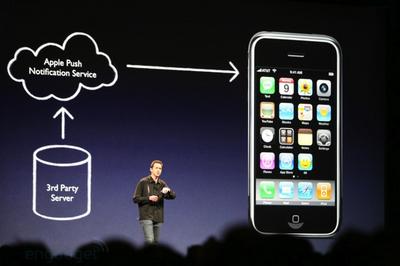
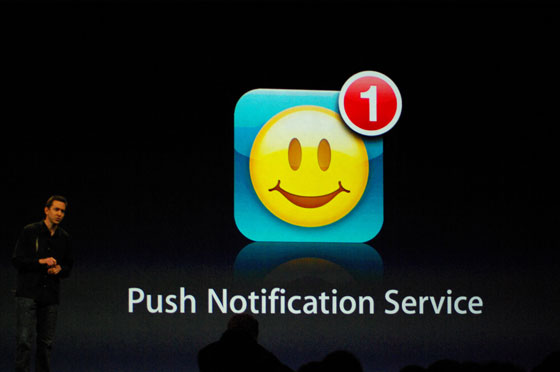
Apple’s Push Notification Announcement

The Apple Push Notification Service is a mobile service created by Apple Inc. that was released with iPhone OS 3.0 on the 17th June 2009. It uses push technology through a constantly-open IP connection to forward notifications from the servers of third party applications to the iPhone or iPod Touch; such notifications may include badges, sounds or custom text alerts.

Apple first announced the service on 9 June 2008 with a slated release for that September; however, as stated by Scott Forstall at the iPhone 3.0 preview event on 17th March 2009, the rollout was rolled back in September after a decision to restructure the APNS for scalability purposes due to the allegedly “overwhelming” response to the announcement of the APNS. At both events, Forstall stated that push notifications were a better means to maintain battery life than background processes (which are used for pull technology) as far as receiving notifications are concerned.

APNS is using XMPP/Jabber, particularly the PubSub extension.

Wikipedia: Apple Push Notification Service

For email, there are PushMail and GPush to ensure you get a notification seconds after you received an email.

For twitter, there are SimplyTweet and Boxcar to notify you when you get a mention or a direct message in Twitter.

For instant messaging, there are BeejiveIM and IM+ to ensure you never miss an instant message.

For reminders, there is NotifyMe to notify you of things to do

For bills payment, there is BillMinder to ensure you will not miss your bill payment.

The list is not comprehensive, there are much more iPhone apps that make use of Push Notification. Mashable also has a post on it, 14 iPhone Apps With Push Notification for Productivity.

For web developers like me, I love Prowl, because there is an API for you to use and ready made classes for
Perl, PHP, Python, Ruby, Java and Lasso. Do note that the IP addresses are limited to 1000 API calls per hour which is better than Twitter’s 150 API calls.

With Prowl, you can customized your own Push Notifications. For me, I have my this web server’s cron setup to check my Twitter account for new mentions and direct messages every 5 minutes and if there are any, it will notify Prowl using the API and Prowl will sent a Push Notification to my iPhone.

If anybody post a comment in this blog, Prowl will also notify me as I have hooked it into WordPress. Next I am thinking of using my backup server’s cron to ping this site every 1 hour, and if there is any downtime, it will also sent a Push Notification to my iPhone. As mentioned earlier, there are endless possibilities on what you can do with Push Notifications using Prowl + Webserver + Cron.

Wednesday, 12th August 2009Wednesday, 12th August 2009
Posted by Lester Chan at 22:58 in Gadget

Before I start this tutorial, I would like to give full credits to crimsontwo from xSellize forums and joshua.menke from cocoaforge. I merely improve on crimsontwo’s work.

In the thread, Gmail + push on iPhone w/ Prowl on xSellize forums, crimsontwo gave instructions on how to run the Prowl python script on your iphone. The downside to it is that if your iPhone connection change from EDGE to 3G or 3G to Wifi or any vice versa, the script will be disconnected from Gmail. To solve this problem, he recommends you to upload the script to your own web server instead.
You need to have SSH access to your web server as well as Python installed in your web server which is not covered in this tutorial.

So here we go:

  1. Get Prowl from App Store for USD$2.99
  2. Register your Prowl account at http://prowl.weks.net/register.php
  3. Once registered, click on Settings Tab
  4. Under API key, click on Generate API Key Button and note copy down your generated API Key
  5. Download the required files in a zip, called, Gmail With Push On iPhone Using Prowl
  6. Using WinZip, extract the zip file which you have downloaded from Step 5
  7. You should see a folder called gmail_and_prowl
  8. Open the file main.py using NotePad or WordPad
  9. You should see these lines on line 11 to 13:

    prowl_apikey = “your_prowl_api_key”
    IMAP_USERNAME = “your_gmail_username”
    IMAP_PASSWORD = “your_gmail_password”

  10. Replace the text your_prowl_api_key, your_gmail_username and your_gmail_password accordingly and save it
  11. Using your FTP, upload the folder gmail_and_prowl to your home directory in your webserver
  12. Login using SSH and browse to the path where you uploaded gmail_and_prowl, for example, /home/username/gmail_and_prowl/
  13. Type this command:

    nohup python main.py > /dev/null 2>&1 &

  14. The PID of the process which is executing the script will be displayed. You may want to know that number down, just in case you need to kill the process.
  15. You can now log out from the SSH and send a test email to your Gmail account