I had not used any dedicated AI recording device before. So when Plaud sent me the Plaud Note Pro for review, I was curious to see whether such hardware could fit my lifestyle.
The Plaud Note Pro is Plaud’s flagship AI note-taker, the successor to the original Plaud Note. The recommended retail price (RRP) is S$259. You can get it from Plaud Official Store or from their official stores on Shopee or Lazada.


Two colors are available: Silver and Black. I have with me the Black.
Unboxing
Inside the box, you will find:
- Plaud Note Pro
- MagSafe Compatible Case
- Magnetic Ring
- Charging Cable
- Quick Start Guide
- Warranty Booklet

I am surprised to see there is a MagSafe-compatible case.


Even if you are on Android, Plaud included a magnetic ring you can use to stick to your Android phone case.

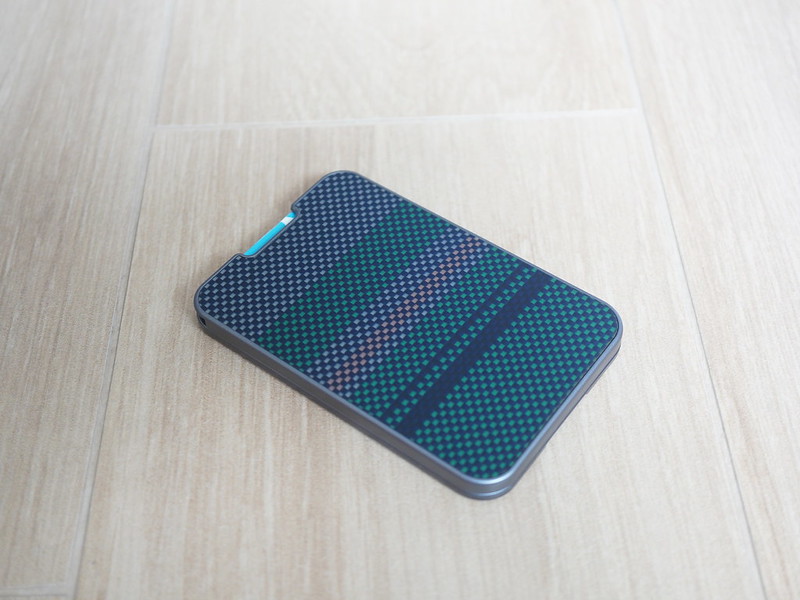
The MagSafe-compatible case is designed to hold the Plaud Note Pro like a card in a wallet.

It has cutouts for the microphones, charging connector, and speaker, so the device remains fully functional while inside it.


Design
The Plaud Note Pro is credit-card-sized and 3mm thick, weighing 30g. Only one button is on the device. Press and hold to start recording; press and hold again to stop. While recording, pressing the button triggers the highlight feature. Press to highlight lets you flag important moments during a recording in real time, so the AI summary focuses on what actually matters instead of burying it in a wall of text.

The thickness is roughly equivalent to three credit cards stacked together (yes, I tried it).

Inside the device is a 500mAh battery that provides up to 30 hours of recording in Enhance Mode (5m pickup range) and 64GB of storage.

Wireless connectivity includes Wi-Fi and Bluetooth Low Energy (BLE) 5.4.
The build is aluminum and feels premium. The front face features a 0.95″ AMOLED display with 600 nits of brightness. It shows recording status, battery level, and transfer progress.
There are four Micro-Electro-Mechanical Systems (MEMS) microphones: two at the top (one on each side) and two at the bottom.

MEMS microphones work by etching a microscopic vibrating membrane onto a silicon chip using the same manufacturing process as computer processors, allowing them to be incredibly small while still accurately capturing sound.
The MEMS are quite impressive. They can pick up audio clearly from a distance, and the recordings come through clearly with no muffled or distorted audio. I tested about 2m away with a standing fan noise in the background.
At the back is the proprietary charging port.

I would have accepted a slightly thicker device for the universality of USB-C or Qi wireless charging. The reason is that if you lose or spoil your cable, you can’t just walk into the store and get another one, so you will have downtime.

Setup
Setup is done through the Plaud app on iOS or Android.
A firmware update is prompted immediately during the first pairing. After that, the device is ready to record.


App
The main screen is a list of all your recordings. Each file shows the recording date, duration, and the title if it has been transcribed. Tapping a file takes you to the transcript view, where you can read the full text and play back the audio.

Transcription does not happen automatically unless you configure it using AutoFlow. By default, you transfer the recording to the app and manually initiate transcription.


Only after transcribing will you see the highlights and summary screen, where the AI breaks down the recording into key moments and a structured summary.


After transcription and summarisation, you can export the output in a variety of formats: plain text, Markdown, PDF, and Microsoft Word.


There are only two recording modes, Ambient and Call.

I do not use Call recording at all, as I rarely talk on the phone and prefer texting, so I use Ambient for everything.

There is also an Automatic Mode that can switch between the two based on context.

Cloud sync is optional. It acts as a backup, but you are not forced to use it. That said, all transcription happens through the cloud, so if you want the AI features, your audio does need to go up to Plaud’s servers at some point. They hold ISO 27001, SOC 2, HIPAA, and GDPR compliance. If your work involves conversations that cannot be routed to an external cloud, the Plaud Note Pro is not for you, regardless of its compliance certifications.

Templates are the backbone of the summary system. They are essentially pre-defined prompts that tell the AI how to structure its output: Meeting Minutes, Action Items, Key Insights, and so on.
You can choose from a marketplace of templates or create your own custom prompt entirely.

I created my own template tuned for gadget reviews, giving me a structure.

File transfer between the device and the phone works both ways. Bluetooth is the default and the simpler option. Alternatively, the device can create its own Wi-Fi hotspot, and your phone can connect directly to it for faster local transfers. This is useful if you have a long recording and want to skip the Bluetooth bottleneck.

AutoFlow works like a trigger-and-action system, similar to If First This Then That (IFTTT).

When it detects certain keywords in a transcript, such as “reviewing” or “review,” it runs a configured template to auto-transcribe and generate a specific summary type. It can push the output to a connected service. As of writing, only email is supported. Third-party integrations with AutoFlow are coming soon.

The integrations screen in the app lists platforms that Plaud supports: Notion, Slack, email, and a few others. It is just a marketing screen. There is no direct integration with any specific note-taking app, so the export process is manual: generate the summary in the Plaud app, export the file, and take it wherever you need it.

Apple Find My is supported, but since it lacks an Ultra-wideband (UWB) chip, precision finding is not available. There is a speaker at the back that emits a sound.

Subscription
You cannot escape subscription if you want to make full use of AI, since running models costs a lot of money.
The free Starter Plan gives you 300 transcription minutes per month: about 5 hours total, or roughly an hour per week. For a hobbyist trying it out, this is fine. For a busy office worker with back-to-back meetings, it might not be enough.
If you run out of transcription minutes, the device still works as a standalone voice recorder. The audio file still gets saved locally, and you can still transfer it to the Plaud app for playback. You only lose all the AI features until your minutes reset.
| Plan | Transcription | Annually | Monthly |
|---|---|---|---|
| Free | 300 mins/month | Free | Free |
| Pro | 1,200 mins/month | S$136.98/year (S$11.42/month) | S$24.98/month |
| Unlimited | Unlimited | S$349.98/year (S$29.16/month) | S$39.98/month |
With the problem of subscription comes the problem of dependency. The transcription and summaries all require AI. Without it, it is just a voice recorder with an app.
The free plan’s 300 minutes is an arbitrary cap that Plaud could reduce at any time. There is no guarantee that the free tier will remain at this level.
For my use case of recording 1 or 2 review sessions per week, each lasting 30 to 45 minutes, the free 300 minutes per month are sufficient. But my use case is light.
If you are using it for work during daily meetings, you would need the Unlimited plan, bringing the total first-year cost to S$259 + $349.98 = S$608.98.

Conclusion
The Plaud Note Pro is a genuinely interesting device with solid hardware and impressive microphones that do what it claims, within the constraints of its subscription model. At S$259, it is a reasonable amount to spend to find out whether it fits your workflow.
It makes the most sense for a small company or team that does not already have AI meeting transcription through Zoom or Teams.
For my personal use case of recording gadget review observations and cleaning them up with Claude, it has potential. Speaking your observations while handling a product is faster than typing them, and having a rough transcript gives Claude something to work with. The raw output is not always clean, with filler words and some rambling, but editing a transcript is faster than writing from scratch.
If all your important conversations are already on Zoom or Teams with AI transcription built in, the use case is limited. The Claude Note Pro fills the face-to-face gap, but whether that alone justifies S$259 depends on how often those situations arise for you.
The single most important thing to understand before buying is the subscription dependency. The free 300 minutes are enough to evaluate the device seriously, and you retain basic voice recording functionality without a subscription. But the AI features that make this more than a glorified voice recorder require a paid plan for any serious use.
So, to me, the Plaud Note Pro is worth buying, since it still offers a free tier with 300 minutes per month, which is enough for hobby projects.