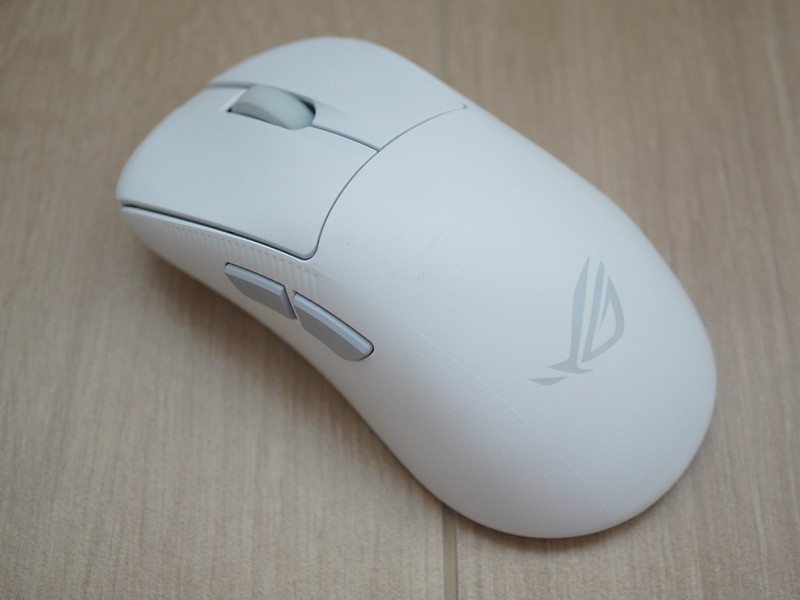
Asus ROG Keris II Origin Gaming Mouse Review
Asus ROG Keris II Ace Gaming Mouse was released back in April 2024. In July 2025, Asus released the Asus ROG Keris II Origin Gaming Mouse.
At the Recommended Retail Price (RRP), the Origin is priced S$10 more expensive than Ace. S$199 vs S$189. One would expect Origin to be an upgraded model. However, Origin is not the successor of the Ace. Both are different mice, each with its pros and cons.
Unboxing


Asus also included two spare ROG Micro Switches II, a micro-switch clip to remove the micro switches, and a dongle extender.

Unboxing the black envelope reveals the ROG stickers, mouse grip tape, and replaceable mouse feet.

Design & Build
Both mouse comes in Black and White and share the same right-handed ergonomic shape.

The hump, grip angle, and button placement are also similar.

There is a difference in the weight. The Ace weighs 54g while the Origin weighs 65g.

Although 11g doesn’t sound like much on paper, it is noticeable. The Ace feels light and agile. The Origin feels more planted, slightly more stable during slower tracking, and less “floaty.”

The coating is also different. The Origin has a smoother matte finish, while Ace has a more textured shell.

Dirt tends to get stuck on the Ace’s textured shell easily compared to the Origin. While on the Origin, fingerprint smudges become more visible on a matte finish, especially on Black.

Both mice have no rattles, and the build quality is solid.
I prefer the Origin here because it is more planted.
Switches
Ace uses non-hot-swappable ROG Optical Micro Switches, while Origin uses ROG Micro Switch II with Push-Fit Switch Socket II, allowing for easy switch swapping.

To swap the switches in the Origin, remove the two rubber stoppers at the bottom to expose the two screws.

Unscrew those and you can pop the casing right off.

Technically, with the Origin, the mouse can last longer, as the switches can be replaced when they wear out. It is less expensive than replacing the entire mouse.

Asus included two extra ROG Micro Switches II inside the box.
The Origin is more clicky, and the clicks are lighter on the Origin. I prefer the clicks on the Origin instead of the Ace. This might be subjective and boils down to personal preference.
RGB Lighting
If you are into RGB lighting, Origin wins the Ace, as it features three areas of RGB: the Scroll Wheel, the Left Side, and the ROG Logo.

Ace only has one area, which is the scroll wheel.
As a semi-RGB lighting enthusiast, Origin wins in this section as well.
Polling Rate
The Origin has a default polling rate of 1000 Hz, as this is the maximum limit of a USB 2.0 port.

Though it supports up to 8000 Hz via ROG Polling Rate Booster, it is not included in the box content. Therefore, you must purchase it separately.
If you have the ROG Polling Rate Booster, it supports 8000 Hz polling wirelessly, whereas the Ace only supports 4000 Hz wirelessly and only supports 8000 Hz via a wired connection.

So, Origin supports 8,000 Hz polling, but doesn’t include the ROG Polling Rate Booster. In contrast, Ace supports 4,000 Hz polling while including the ROG Polling Rate Booster.
I say Ace wins in this section.
Battery Life
When compared with RGB lighting off, Origin has better battery life than Ace, with 127 hours vs. 107 hours.
If you are getting the Origin, you’re likely into RGB lighting as well, so there’s no point in keeping the RGB lighting off to conserve battery life.
I would say both Origin and Ace are tied in this section.
Software
Gear Link is Asus ROG’s browser-based configuration tool for their ROG peripherals.

You no longer need to install Armoury Crate just to configure your ROG peripherals. You just have to visit gearlink.asus.com and you can setup your ROG peripherals.

Origin supports Gear Link, but Ace doesn’t support it yet. There is no word on whether Asus will bring Gear Link support to older peripherals.
Again, I would say that both Origin and Ace are tied in this section, as there is a chance that Asus may bring Gear Link support to the Ace.
Conclusion
Both the Asus ROG Keris II Origin and Keris II Ace are excellent mice, but they serve slightly different purposes, and it ultimately boils down to personal preference.
I prefer the Origin because of its more planted (heavier) and clicky feel. The texture of the Origin is also better for me as it doesn’t trap dirt easily.

Features such as hot-swappable switches, an 8,000 Hz wireless polling rate, RGB lighting, Gear Link browser-based configuration tool, and improved battery life are all added benefits.
The only downside is that Asus did not include the Polling Rate Booster inside the box and requires you to purchase it separately.