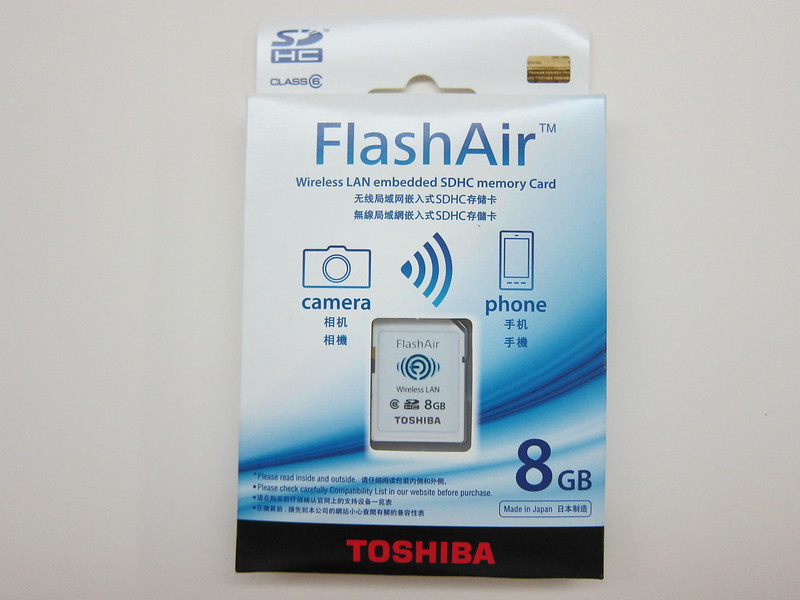
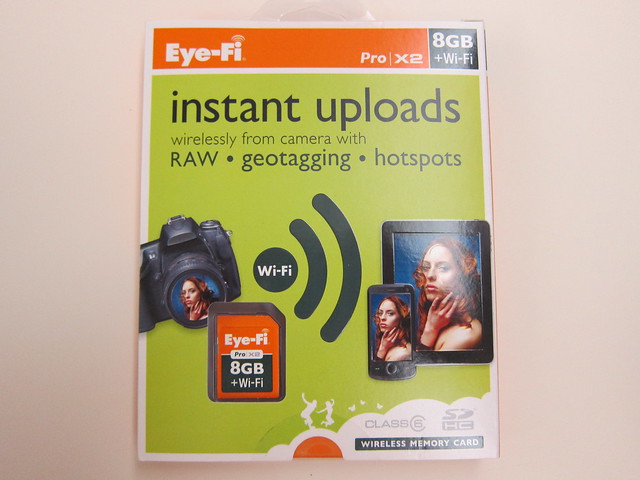
Toshiba FlashAir is the “no frills” version you can get out of Flucard Pro and Eye-Fi Pro.
It is being distributed by Trek 2000 (makers of Thumbdrive) in Singapore and is retailing for S$100+. Since Trek don’t enforce a Recommended Retail Pricing (RRP) model to the dealers, I can’t give you an official pricing. Right now only 1 capacity is available which is the 8GB.
What it does is extremely simple, apart from a 8GB Class 6 SD Card that stores your camera pictures, it creates a wireless network that allows up to 3 wireless connections to the SD Card to browse the pictures captured and if you need, you can always save the pictures to your device without the need of going through a computer using a SD Card reader.
And basically that’s all it does! The only settings you will get is to configure the SSID name and wireless security. By default the SSID name will be “flashair_xxxxxx” and the default passcode for the WPA2 security is “12345678”. Once connected, you can access your photos by typing http://flashair in your mobile browser.


Specifications
- Card capacity: 8GB
- Speed Class: Speed Class 6
- Compliant standard: SD Memory Card Standard Ver.4.00
- Wireless LAN Standard: IEEE802.11b/g/n
- Wireless LAN Security: WEP, TKIP, AES (WPA, WPA2) WPA2 Default
- Power Supply Voltage: 2.7 to 3.6V
- Operating Environment Temperature: -25 to 85°C
- Humidity: 95%RH (at 25°C, no condensation)
- Dimensions: 32.0mm(L) x 24.0mm(W) x 2.1mm(T)
- Weight: 2g


Since it is pretty much no-frills, the initialisation time (when plugged into the camera) is close to that of a normal SD Card and when browsing the pictures stored inside the SD Card via Wi-Fi, it is more responsive than FluCard Pro or Eye-Fi.


Use Case
A good use case for this is when you take pictures using your digital camera during an event like a concert and you need to post the pictures taken on Facebook, Twitter or Instagram. With the FlashAir, you can connect to it via Wi-Fi and save the pictures that you want to your phone and Facebook, Tweet or Instagram about it.
What Li Xiang (my wife) would do previously, was to use the phone camera to take the LCD of the digital camera while previewing the picture.
The only troublesome part when using the FlashAir, is after you saved the pictures, you need to disconnect the wireless so that your phone will switch to 3G/LTE connection in order to get Internet connection.
Of course you can avoid all the hassle and just use the camera in your phone to take, but there is a limit of what your phone’s camera can do. It lacks optical zoom and in dark places, a digital camera still perform much better.
Cameras With FlashAir Compatibility
Some digital cameras have built-in FlashAir Compatibility like the Olympus’s E-PM2 and Pen E-PL or the Casio’s Exilim EX-ZR300.
For Olympus’s E-PM2 and Pen E-PL5, you are able to set the SSID as well as the wireless security directly via the camera interface.
And together with the Olympus Image Share app, you will be able to download photos and video files (you can even choose to download it in a lower quality for convenient sharing) and using the Art Filter function to edit your pictures.
For Casio’s digital camerad, the supported models are: Exilim EX-ZR300, Exilim EX-ZR200, Exilim EX-ZR20, Exilim EX-ZR15 and Exilim EX-FC200S.
These cameras can control the switching on/off of the Wireless LAN of FlashAir and indicates the transmission status on the camera LCD screen.
Summary
If you do not need the bells and whistles of the Flucard Pro and Eye-Fi, I totally recommend the FlashAir for you. I might get one for myself (in case you are wondering, I don’t get to keep this review unit).
Pros:
- No frills
- Simple to setup
- Fast & responsive
Cons:
- A little pricey


I have a hard time getting this to work. It’s can’t work on my Nikon D800, which it has issue with other wifi card such as eyefi. It has intermittent connection issues with my D3100, which was stated as a compatible model.
Chris, from my knowledge, Nikon cameras have some auto-power-saving features (i.e. the power supply cuts off after, say, a minute etc.). Remember, these Wi-Fi cards need power-supply, so when the power-saving kicks in, the Wi-Fi gets cut-off. All you need to do is to disable or delay the auto-power-saving features and everything will be great. Tell me if works. 🙂
I saw in the link that I attached below that if you work with the live view option it will work fine on D800 .
I also have D800e and have hard time to make it work , finally I success to make it work after update the card firmware and change the “auto WiFi start” to start only when I change image protection to 1 of my picture I already take using this card . also have to work with live view because signal lost after few second in standard mode.
I found the firmware update tool and card setup tool in this address :
good luck
hi
got this flash air card which i intent to use it on my desktop window xp (connected with prolink router with wireless enabled)
followed the instructions according to the attached instructions enclosed with the card
unable to see the pictures on the desktop computer.
unable to access the 192.168.0.1 ip id of the card,
when i type this address and hit enter, it display internet explorer unable to find pages
had googled this problem but no answer found
appreciate any advise from u
Your router has nothing to do with this. I think you got it mistaken. Your FlashAir will create a wireless network and your PC/Mobile suppose to connect to your FlashAir wireless network not your router =p
Hi, Lester:
I must be the world’s worst co-4101mputer understander!
I did download the FlashAir on my computer and when it came up to change the code number i put an easy 8 digit number in and now my wi-fi won’t connect. how do i go back and put back in the 12345678?
I have had so much trouble doing this ‘simple’ action.
Thanks for your help.
David Irvin 817-946-4101 photo@dsirvin.com http://www.dsirvin.com
Hi lester how to know if my digital cam is flashair compatible? Is there any way to find out thru the box/manual?
Hey, as long as your camera supports SDHC memory card, it will be compatible.
Sorry lester I’m still blur. My camera only accept micro sd and micro sdhc so does it mean I can’t use flashair sdhc class 10?
yeap, your camera must be using the normal SD card and not the Micro SD =)
How can I select and download several files AT THE SAME TIME from the FlashAir web browser to my computer?
I’ve managed so far to download just on file at the time (mouse right click), which is very slow. H.
I think the fastest way is to put it in a SD Card Reader and use your computer to copy and paste all the pictures rather than using the web browser.
so essentially this is just to browse on a browser or maybe download a picture or two otherwise if you want to transfer many pictures like 40 or 50 or more than this is essentially useless
thanks a lot!
jimmy, i found that if you download their android app, you can download many or all pictures at once to your mobile device, but still cannot find anything for a PC
I’ll try it thanks again. very frustrating, having bought the card with the idea of transferring all files at once like on a Sony wifi camera.
Does anybody got to find a solution to download multiple files to a PC at once? (Not smartphone/tablet)
If so, please, share the solution here, I’m trying to find the same goal. Thanks.
I have a hard time getting this to work. It’s can’t work on my Nikon
D90, which was stated as a
compatible model.
I believe I found a way to download all FlashAir SD card files to a PC in one shot. Use FireFox and get the add-in called “DownloadThemAll!”. Browse to http://flashair then the picture folder of the SD card. Now right click in the web page and choose the “DownloadThemAll!” add-in. Select all the files you want to download and start the transfer. Let me know if this works for you!
I didn’t test it, but think that will only download the thumbnails generated on the webpage you are on and not download via wifi from the SD card the original images.
Hi Lester,
Why is it the pictures I saved from the sd card to my phone appears blur?
but my camera picts are very clear.
Sorry I don’t know how to answer that question. Normally when you see on camera screen, it is clearer because the screen size is smaller.
I just found out the reason why. Thanks anyway.
FYI, It’s actually because I din fully view inside the picts before i saved.
I save the picts from gallery. It should be done one by one. =)