Been almost 9 months since I did an upgrade to this site, so I guess it is time for me to post a site update. Most of it is about optimising the site so that it performs faster and better.
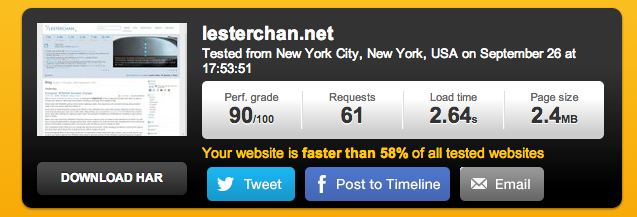
This site now has a performance score of 90 out of 100 for Pingdom’s Website Speed Test!
Bootstrap 3.0
One of the most tedious but hardly noticeable task was to upgrade Bootstrap 2.3.2 to Bootstrap 3.0.
Search Autocomplete
Added search autocomplete for the search form at the top, powered by Twitter typeahead.js.

CDN
My host, Vodien, just became a reseller of EdgeCast which is also a CDN and hence I will be using it side-by-side with MaxCDN. I am randomising it right now between the two.
I also just bought a new domain name lcstatic.net and I will be using it as the CDN domain. The reason for a new domain name is because of Cookie-free Domains.
When the browser makes a request for a static image and sends cookies together with the request, the server doesn’t have any use for those cookies. So they only create network traffic for no good reason. You should make sure static components are requested with cookie-free requests. Create a subdomain and host all your static components there.
Something not visible but related to static assets, copied HTML5 Boilerplate’s .htaccess over to my own for better headers on static assets.
I also added DNS prefetch headers to the site’s header HTML for almost all the static URLS that I used.
status.lesterchan.net
I am now using Pingdom instead of WatchMouse for Public Status Page. You can check the status of lesterchan.net at status.lesterchan.net or via @lcstatus on Twitter.


Awesome stuff, Lester. Thanks for sharing! Lots to learn from what you’ve been doing to your blog!
Thanks Daniel I miss out 1 point which is https://developer.mozilla.org/en/docs/Controlling_DNS_prefetching, Just edited the post =)
Lester, cool stuff.
Your post kinda’ spurred me to re-look my blog optimization tweaks. Question: What results did you get on the Dallas and Amsterdam servers? Always found Amsterdam to return longer load times for me. See my results here: http://wp.me/p2ZvDK-18q
Also, I’m finding hard to understand a new domain as CDN. Will it be hosted on your same server on one primary location? I thought the reason for CDN in the first place was multiple geo-locations?
Yea Amsterdam is always slower, i tested from the US because most people who read my blog are from the US and Singapore.
Yes it is hosted on the same server, just a parked domain. But if you are using the same hostname as your website. eg cdn.yoursite.com, every request to the static assets will also send a few KBs of cookie along side with it because some cookie are set to be used for the whole *.yoursite.com.
Well, I have another domain name which is incidentally parked on my same managed hosting. Was thinking about your idea of a static site since I’m not using that domain much. On second thought, sounds to me like self-hosted CDN. I noticed you are on MaxCDN and even EdgeCast now. Still don’t see how a self-hosted solution will help. Amazon S3 maybe, but I’m not sure about a parked domain on same server.
My MaxCDN and EdgeCast are sponsor my CDN, I will go for CloudFront Pull CDN model, you don’t need S3 since you don’t need to store assets there, the CDN pull it from your server and caches it on their edge locations
Lester,
When you do get down to this and have it sorted, let me know. I setup a subdomain instead of using a full domain to serve static files without cookies. WordPress doesn’t seem to wanna talk to my subdomain (images broken). Still looking around fro a rewrite rule into Nginx.
If your main domain is setting it’s cookie as .maindomain, the cookies will still be sent.
True. I got cookies now on www.
Then again, haven’t been able to figure out how to get WordPress to read from my subdomain instead.
At the moment, just seems like too much messing around for little gain.
Why you need to get WP to read from your subdomain?
Well, the idea was to have the subdomain host static files without cookies. That way, I can have my images, js and css files served via the subdomain. Only think is WP still reads from http://mydomain.com/wp-content/… Wasn’t able to figure out how to get it to read from http://cdn.mydomain.com/wp-content/…
That really depends on how your theme coded, you can use the filter “stylesheet_directory_uri” to change it to cdn.mydomain.com. I am using that