After the move to nginx/php-fpm, the next natural course of action is to move to HHVM and php-fpm as a fallback.
What is HHVM?
HHVM is an open-source virtual machine designed for executing programs written in Hack and PHP. HHVM uses a just-in-time (JIT) compilation approach to achieve superior performance while maintaining the development flexibility that PHP provides. HHVM is developed by Facebook.
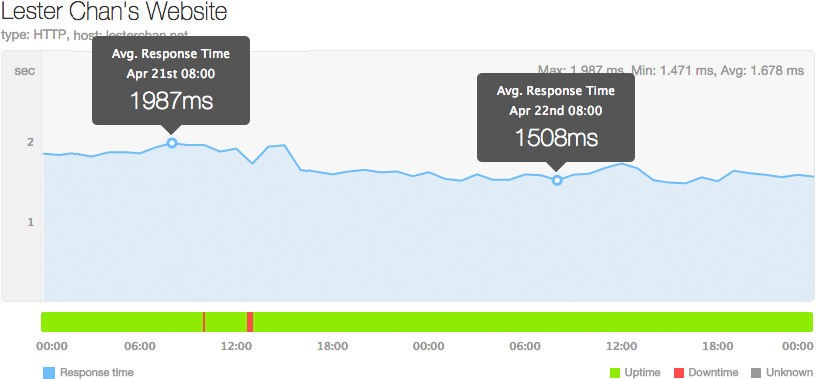
As a result my response time drop by another 400ms to about 1,500ms from 1,900ms as shown in the screenshot below.
Installing HHVM
$ apt-get install software-properties-common
$ apt-key adv --recv-keys --keyserver hkp://keyserver.ubuntu.com:80 0x5a16e7281be7a449
$ add-apt-repository 'deb http://dl.hhvm.com/ubuntu trusty main'
$ apt-get update
$ apt-get install hhvm
nginx’s HHVM config (hhvm.conf)
location ~ \.(hh|php)$ {
    proxy_intercept_errors on;
    error_page 502 = @fallback;

    try_files $uri =404;
    fastcgi_split_path_info ^(.+\.php)(/.+)$;
    if (!-f $document_root$fastcgi_script_name) {
        return 404;
    }

    fastcgi_keep_conn on;

    include fastcgi_params;

    fastcgi_index index.php;
    fastcgi_pass unix:/var/run/hhvm/server.sock;
}
location @fallback {
    try_files $uri =404;
    fastcgi_split_path_info ^(.+\.php)(/.+)$;
    if (!-f $document_root$fastcgi_script_name) {
        return 404;
    }

    include fastcgi_params;

    fastcgi_index index.php;
    fastcgi_pass unix:/var/run/php5-fpm.sock;
}
HHVM config (server.ini)
I am running HHVM through a file socket.
hhvm.server.type = fastcgi
hhvm.server.file_socket=/var/run/hhvm/server.sock
Previously, I can’t install HHVM because my VM is on the 32-bit version of Ubuntu 14.04.2 LTS (Trusty Tahr). HHVM only supports 64-bit machines.