Spend the weekends trying to get Cacti up and running on this VPS. Apparently since this VPS is using WHM on CentOS, there are some packages like Apache, PHP, MYSQL, Perl, Ruby installed directly but not indicated as installed via Yum and hence it is failing dependency check when trying to install rrdtool.
What is Cacti
Cacti is a complete network graphing solution designed to harness the power of RRDTool’s data storage and graphing functionality. Cacti provides a fast poller, advanced graph, multiple data acquisition methods, and user management features out of the box. All of this is wrapped in an intuitive, easy to use interface that makes sense for LAN-sized installation templating s up to complex networks with hundreds of devices.
What is RRDtool
RRDtool is the OpenSource industry standard, high performance data logging and graphing system for time series data. RRDtool can be easily integrated in shell scripts, perl, python, ruby, lua or tcl applications.
Spent almost the whole day trying to get that installed but to no avail. Found this tutorial, Install RRDTool on Red Hat Enterprise Linux, followed it and I managed to get rrdtool up and running.
Next was the easy step which is to download Cacti and upload it to this server. PHP and MYSQL is needed to run Cacti and hence you need to create a MYSQL database and account for Cacti.
Once that is done, remember to import the existing database data/structure in cacti.sql into the database, if not you will get segfault errors when accessing your Cacti.
You will also need to create a cron job that runs once every 5 minutes to populate contents for Cacti, refer to Install and Configure Cacti.
Now what you need are templates/graphs to monitor your Apache, MYSQL, Memcached and even your server. For Apache and MYSQL you can use mysql-cacti-templates, even for Memcached, you can use that, but personally I am using memcached Cacti Template.
Remember that each scripts you download requires configuration in the script itself.
Everything is up and running, now it is the time to create a custom graph if you want, you can take a look at Making Your Scripts Work With Cacti.
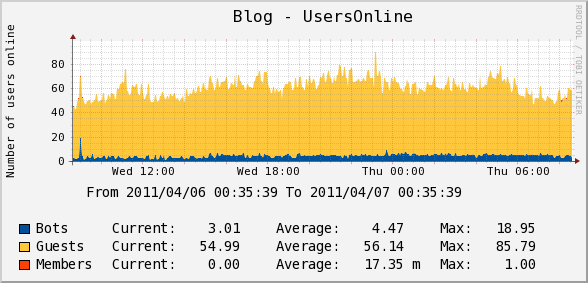
I created a custom script to pull the number of usersonline on my site via my WordPress WP-UserOnline plugin and populate it in Cacti.
If you are using iPhone/iPad, there is also an app for it called iCacti (Universal App) which cost USD$3.99. I bought it instantly when I discovered that there is an app for Cacti. Works well with https/http auth and normal login.

Blog – UsersOnline (Custom)

Server – Load Average

Apache – Requests

MYSQL – Command Counters

Memcached – Requests Per Second
Copy and pasted from PHP 5.3.0 Release Announcement.
The PHP development team is proud to announce the immediate release of PHP 5.3.0. This release is a major improvement in the 5.X series, which includes a large number of new features and bug fixes.
The key features of PHP 5.3.0 include:
E_DEPRECATED (part of E_ALL) instead of the E_STRICT error levelThis release also drops several extensions and unifies the usage of internal APIs. Users should be aware of the following known backwards compatibility breaks:
For users upgrading from PHP 5.2 there is a migration guide available here, detailing the changes between those releases and PHP 5.3.0.
For a full list of changes in PHP 5.3.0, see the ChangeLog.
PHP 4.4.9 had been released and that is the last PHP4 update we will ever see as PHP4 has reached the End-of-life (EOL) as on 8th August 2008.
PHP 5.3 will be due somewhere between mid September and mid October of 2008.
So for goodness sake, bug your lazy server administrator to upgrade to PHP5!
If your host refuses to upgrade to PHP4, ditch them and come over to FRRO. Here at FRRO, we always try our very best to keep our software as up to date as possible.
I spoke about Developing Plugins For WordPress on Wednesday, 18th June 2008 at the Singapore PHP User Group, June 2008 meetup.
This is the second time I am speaking at the user group. The first time was in December 2007 meetup where I spoke about the same topic WorPress Plugin Development With PHP.

I think this time my pace was slightly better.
By embedding this video, it breaks my site XHTML validation!
Powerpoint Slides and Source Code can be downloaded here.
I spoke about WorPress Plugin Development with PHP on Wednesday, 12th December 2007 at the Singapore PHP User Group, December 2007 meetup.
That is the first time I am speaking publicly and hence I was quite nervous and spoke very fast.
During normal days, I speak very fast (all my friends said that) + my nervous = super fast speaking
Anyway, enjoy this fast paced video:
And yes, embedding this video breaks my site XHTML validation!
*UPDATE* The slides can be downloaded here.
Users: 54 Guests, 2 Bots