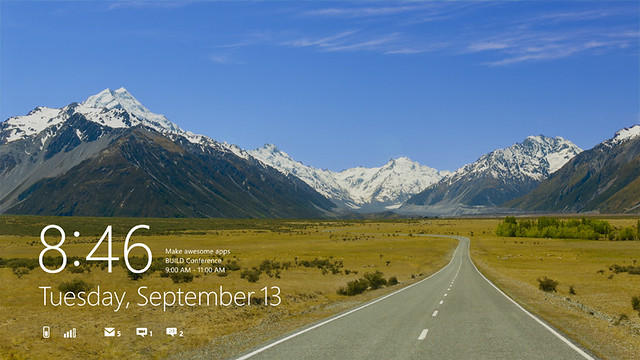
This is our final pre-release, and includes Windows 8, Internet Explorer 10, new Windows 8 apps for connecting to Hotmail, SkyDrive, and Messenger (and many more), and hundreds of new and updated apps in the Windows Store. Since our first preview release last September, millions of people now use the pre-release product on a daily basis and millions more have been taking it through its paces, totaling hundreds of millions of hours of testing. We genuinely appreciate the effort that so many have put into pre-release testing, and of course, we appreciate the feedback too. Direct feedback and feedback through usage contributed to hundreds of visible changes in the product and tens of thousands of under-the-hood changes.
The last time we saw a preview of Windows 8 was during Computex back on 2nd June 2011. Yesterday at the BUILD conference, Microsoft showcased Microsoft Windows 8 Developer Preview.
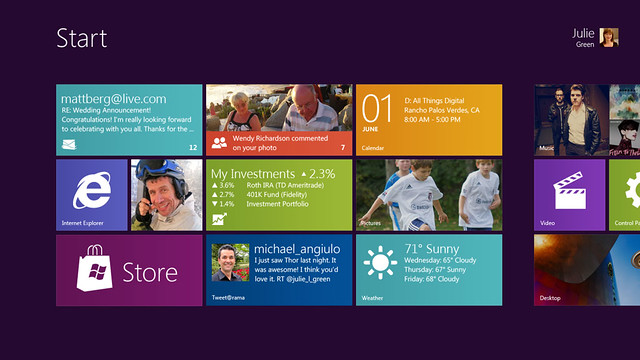
The new Metro UI look awesome, hopefully this time round, Microsoft will make the UI consistent throughout the whole Windows. Microsoft has learned from their mistake and the Metro UI is now built for touch rather than mouse from the group up. It is just wrong slapping a touch UI to Windows 7, it just does not work.
TAIPEI, Taiwan – June 2, 2011 – At 2011 Computex today, Microsoft Corp. showed hardware partners the next version of Windows, internally code-named “Windows 8”, to help the partners build devices that take advantage of the new user experience. As part of this technical preview, Mike Angiulo, corporate vice president of Windows Planning, Hardware and PC Ecosystem at Microsoft, demonstrated how “Windows 8” is optimized for newer touch-centric hardware, including tablets, while still delivering the flexibility, connectivity and power that people have come to expect from Windows today.
The technical demonstration also highlighted the new operating system’s ability to work across both x86 and ARM-based architectures, with a variety of early prototypes shown running the new operating system. Microsoft and silicon chip makers AMD, Intel Corporation, NVIDIA Corp., Qualcomm Inc. and Texas Instruments Inc. initially announced plans in January to work together on the next version of Windows.
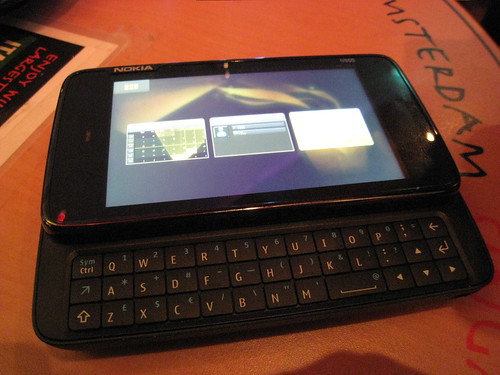
Went to the Nokia N900 blogger preview which took place at Segafredo located at 51 Telok Ayer Street, #01-06, Chinasquare Plaza. First off, the Nokia N900 will be launching in Singapore at the end of March 2010. No local pricing is available yet, but elsewhere the RRP is US$649 = S$911.78.
Went for the Nokia N97 Blogger Preview at Nokia Singapore office located at Alexandra Technopark. The Nokia N97 will be the next Nokia flagship device. It felt solid when I got my hands on it. There will be 2 colors for it. The black as well as the pearl white. There are a lot of interesting applications/widgets that you can place on the home screen such as Facebook, Stocks, Weather, etc. Gone are those days of those boring Active Standby screen which exists all the way till the N96. You can have up to 5 widgets on the home screen which you can arrange in any order you like. A neat feature which not many people may know is there if you swipe to the left or right of the home screen, all your widgets will be hidden to protect your privacy. Swipe again to get them back.
The sensitivity of the screen is just average due to the technology used. If I am not wrong, the N97 is using a resistive screen to cater for a wider audience with many different methods of input instead of a capacitive screen and hence scrolling or “flickering” is not as smooth as iPhone. That is the only complaint I have. In terms of responsiveness, I felt that it is more responsive than the iPhone. Typing on the mini QWERTY keyboard is quite smooth for me as the keys are not clustered together.