In my previous blog post on SingTel Bridge Data Roaming – Part 1 which is dated 3 months ago, since then SingTel has upgraded their SMS system for activating the Bridge Data Roaming. In the previous system, you can’t activate Bridge DataRoam Unlimited via SMS which is cheaper than Bridge DataRoam Unlimited Plus plan if you are only data roaming in 1 country.
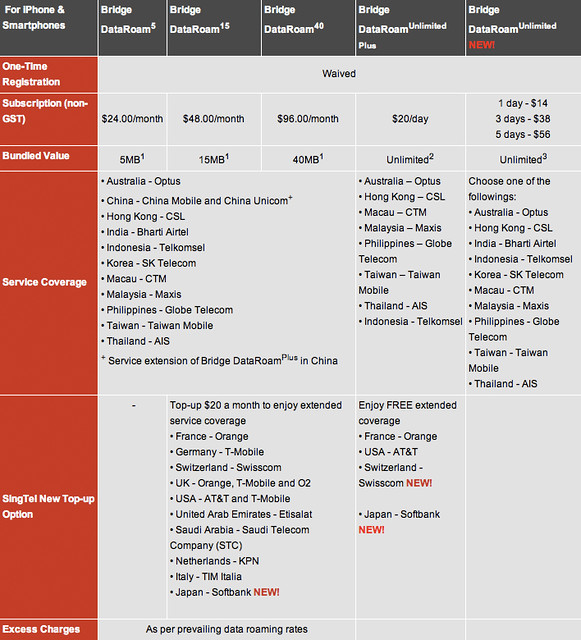
Bridge DataRoam Unlimited Plus
- Price: S$20/day
- Data Bundle: Unlimited
-
Service Coverage
- Australia – Optus
- Hong Kong – CSL
- Indonesia – Telkomsel
- Macau – CTM
- Malaysia – Maxis
- Philippines – Globe Telecom
- Taiwan – Taiwan Mobile
- Thailand – AIS
-
Enjoy FREE extended coverage
- France – Orange
- USA – AT&T
- Switzerland – Swisscom
- Japan – Softbank
Bridge DataRoam Unlimited
- Price
- 1 day – S$14
- 3 days – S$38
- 5 days – S$56
- Data Bundle: Unlimited
-
Service Coverage
- Australia – Optus
- Hong Kong – CSL
- India – Bharti Airtel
- Indonesia – Telkomsel
- Korea – SK Telecom
- Macau – CTM
- Malaysia – Maxis
- Philippines – Globe Telecom
- Taiwan – Taiwan Mobile
- Thailand – AIS
As you can see on the prices above, most people will be opting for Bridge DataRoam Unlimited instead as you will be traveling only to 1 country and stay there for a few days, before proceeding back home or travelling to another country.
When I was in Hong Kong on 22nd April 2011 to 26th April 2011, I activated the 5-day Bridge DataRoam Unlimited for S$56, which is about S$11+ per day, cheaper than paying for my hotel Internet.
Personally I find the price is pretty reasonable. Some countries might have cheaper alternatives like in Hong Kong, the local pre-paid SIM card from Three (which has a MicroSIM version as well), charges only HK$28 (~S$4.50) for unlimited usage of data in a day.
If you are using Bridge Data Roaming, you need to remember not to use “Automatic Network Selection” which is by default on for most if not all phones. Instead you need to select “Manual Network Selection” and choose your preferred network which in my case is CSL in Hong Kong. This is to ensure that your data will not wonder off to another telecom network in the country (without your knowing) which is not part of the Bridge Alliance.
Screenshots of the steps I took to activate my bridge data roaming when in Hong Kong


In terms of speed, I am pretty disappointed during the last few days of my trip, when I arrived in Hong Kong on 22nd, my speed was pretty good as seen from the first screenshot of speedtest.net. But subsequently, my speed seems to be capped at 0.05Mbps for both upstream and downstream no matter where I am. I thought it was a speed cap for bridge data roaming.
However when I came back to Singapore, I am getting this cap as well no matter where I am. I thought that is something wrong with my iPhone 4 and wanted to do a restore. Luckily I didn’t because yesterday, it just resolved by itself. So I am guessing that is something really wrong with SingTel network for the past few days which is making me get this “crap cap speed”.


Hopefully I am able to test the speed in more countries, so that I can make a conclusion. I should be travelling to Malaysia and Indonesia next.
SingTel Travelling Overseas: Roaming
Official Site: Bridge Alliance



Thank you for posting this. I spent 30 minutes on the phone with a helpless CSR from SingTel who was trying her best t upsell me on the pre purchased days instead of unlimited and refused to tell me about the SMS option… as if I really want to call SingTel everytime I visit a new country and need to roam!
Cool, glad you found this information useful!
Hi Lester Chan,
I just got back from Malaysia, after having subscribed to Singtel’s Bridge DataRoam unlimited. I too experienced extremely slow download speed on my iPhone 4. On average, 0.05Mbps. I’ve tried all I could to troubleshoot the problem, but to no avail.
I’m glad to read that your ‘crap speed’ restored itself. May I ask how long before the network was restored? I’m back in mainland Singapore for 4 days and I’m still getting ‘crap speed’.
-iFursham-
Hey, you experience the same thing too? Looks like I am not along, it took me about 2 days to get it restored.
Tip for those purchased their device from second hand dealer or auction
Few weeks before going to your intended country and activating roaming ensure that the device IMEI number is not reported lost or stolen in the country you are intending to use roaming using background check tools such as checkmend it worth paying for the background check service like this as it can save a lot of headache as when it is barred by the network,roaming will not be usable and you will have problem troubleshooting it
If it found to be barred in the country you intended to visit either sell the device in ebay as barred or parts and use the money to buy a device from an authorized dealer like Nubox for apple devices