Configuring iPhone/iPod Touch WLAN For NUS Wireless
Here is a tutorial on how to configure your iPhone, iPhone 3G, iPhone 3GS, iPod Touch, or iPod Touch (2nd Gen) to connect to the NUS Wireless network. We will be using NUS WLAN SSID “NUS” instead of “NUSOPEN”, as “NUS” is protected by PEAP and it is much faster.
*UPDATE 2* There is a bug in iOS4 which cause .mobileconfig files not recognized by Safari. For more details, read here. To overcome this issue:
- Using your computer, go to https://lesterchan.net/nus/iphone/
- Key in your NUSNET UserID and click Generate
- Your browser should prompt you to download the NUS.mobileconfig file
- Once you have downloaded the file, email the file to yourself
- Using Mail.app in your iOS, open up the email which contains the NUS.mobileconfig attachement
- You should now be able to install the NUS.mobileconfig profile
*UPDATE* It is now working with iOS 3.0.
Instructions
- Launch Safari in your iPhone/iPod Touch
- Go to https://lesterchan.net/nus/iphone/
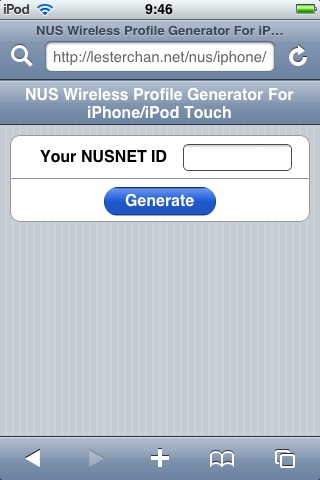
- Under Your NUSNET ID, key in your NUSNET UserID (EXCLUDING the domain (NUSSTU, NUSSTF or GUEST) portion)
- Click Generate
- A Install Profile screen will appear
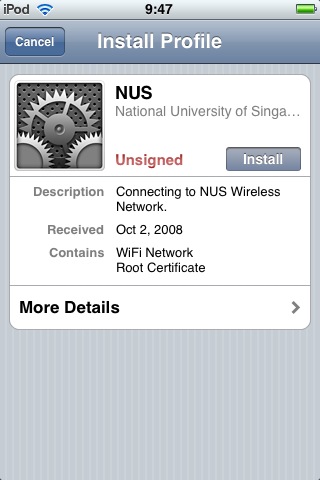
- Click Install
- A Install Profile Warning Popup will appear
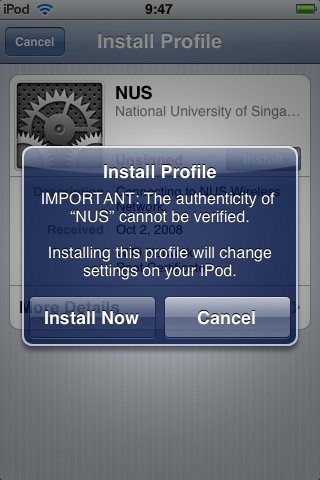
- Ignore the warning and click Install Now
- A Enter Password screen will appear
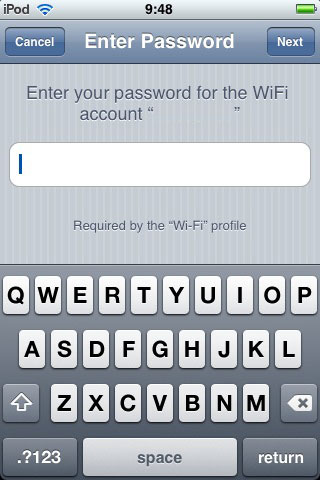
- Key in your NUSNET Password
- Click Next
- A Profile Installed screen will appear
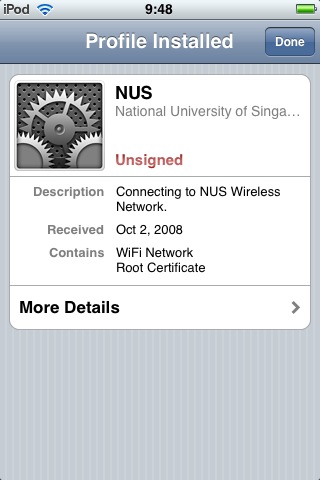
- Click Done
- Go back to your Home Screen
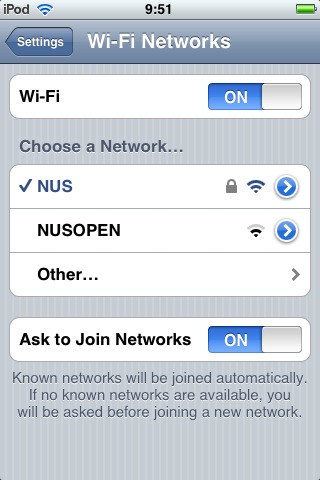
- Go to Settings -> Wi-Fi
- Under Wi-Fi, select ON
- Under Choose a Network…, select NUS
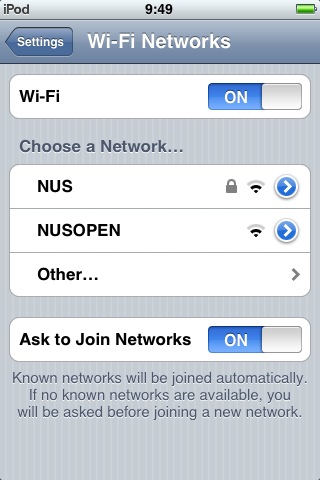
- Wait a while, while it trys to connects
- A Certificate screen will appear
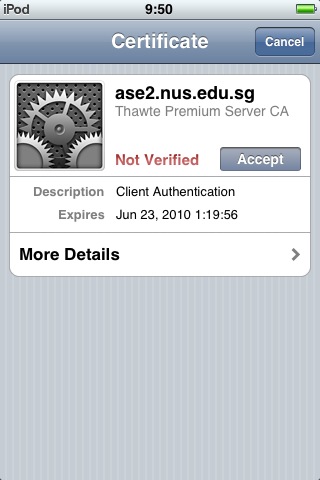
- Click Accept
- You are now connected to NUS WLAN SSID
Notes
- At Step 18, you may need to re-try Step 14 to 17 if it takes more than 1 minute to connect.
- At Step 20, you may need to re-try Step 14 to 20 if nothing happens when you click Accept.
- If you are going to reference this tutorial anywhere, please credit it to me. I spent a lot of time on figuring out how to configure my iPhone 3G to connect to NUS Wireless network and I have put together this tutorial to make life easier for all NUS students.
Privacy
- The generator DOES NOT save your NUSNET UserID on this server.
- At Step 10, when asked to key in your password, it is iPhone authenticating with NUS and NOT with this server.
- In short, you can rest assured that NONE of your information is saved on this server.