Archives For Tag 'desktop'Archives For Tag 'desktop' Home » Blog » Tag » desktop
You are browsing lesterchan.net blog archives page by tag 'desktop'.
Monday, 6th September 2010Monday, 6th September 2010
Posted by Lester Chan at 19:55 in Gadget

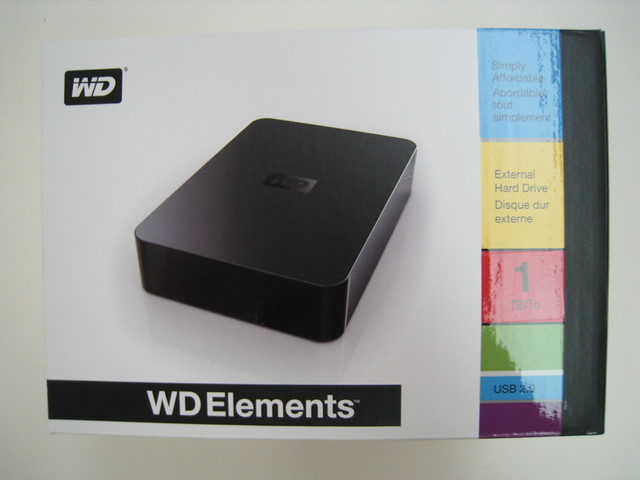
While I was in Vietnam over the weekends, my brother offered to help me get the Western Digital Elements Desktop 1TB harddrive from Comex 2010 at Bizgram stall. I am going to use the HDD for my MacBook Pro Time Machine backup.

Western Digital Elements
Western Digital Elements Portable 320GB- SGD$69.90
Western Digital Elements Portable 500GB- SGD$89.90
Western Digital Elements Portable 750GB- SGD$129.90
Western Digital Elements Portable 1TB – SGD$169.90

Western Digital Elements Desktop 1TB – SGD$109.90
Western Digital Elements Desktop 1.6TB – SGD$139.90
Western Digital Elements Desktop 2TB – SGD$169.90

Source: Western Digital Elements Pricelist

Western Digital My Passport/Book

Western Digital My Passport Essential 500GB – SGD$99.90
Western Digital My Passport Essential 750GB – SGD$139.90
Western Digital My Passport Essential 1TB – SGD$179.90

Western Digital My Book Essential 1TB – SGD$119.90
Western Digital My Book Essential 2TB – SGD$179.90

Source: Western Digital Pricelist

I prefer the WD Elements than WD My Book Essential simply because WD Elements is a no nonsense HDD, it does not include all those crap software like SmartWare within the HDD . It is just the HDD and nothing else. Also it is SGD$10 cheaper than Western Digital My Book Essential. Check out the comparison chart. I also prefer the Matt Black finish of the WD Elements than the Piano Black of WD My Book Essential.


Box Front


Box Contents


Matt Black


USB & Power Port


Power Indicator At The Back


Time Machine

Thursday, 13th August 2009Thursday, 13th August 2009
Posted by Lester Chan at 22:47 in Blog

My mom ordered 4 Dell Vostro 220 Mini Tower Desktop computers for her company last week. This week, 3 units came on Tuesday and 1 unit came on Wednesday. I was there on Wednesday to help her setup the computers. I managed to setup everything for the 3 units that came on Tuesday. So happen when I wanted to setup the unit that came on Wednesday, there was a problem! The first time I switch on the PC, I got a BOSD after reading Dell’s EULA. After rebooting, it will load Windows XP and then hang at the “Pre-installing Factory Settings”. I tried like 10 times, all the same results. Ran the diagnostics CD that came with the PC as told by the Dell telephone support personnel, but I can’t seem to find any problem with the hardware like the HDD or the RAM. So I suspect it must be either the motherboard or the integrated graphics card as those are not tested in the diagnostics.

Dell’s engineer came down today and said there was a problem with the motherboard bios configuration and he changed the whole motherboard and now everything is fine.

Here are the customized specifications of the Dell Vostro 220 Mini Tower Desktop:

  • Intel Core 2 Duo Processor E7400 (2.80GHz, 3MB, 1066MHz FSB)
  • 4GB (2X2GB) NECC Dual Channel DDR2 800MHz SD RAM Memory
  • 320GB SATA 3.0Gb/s Hard Drive with Native Command Queuing
  • 16X DVD + / – RW WITH Dual Layer Write Capabilities
  • Dell E1910H 18.5″ Widescreen Flat Panel
  • Integrated 5.1 Channel (Audio) Capable
  • Windows Vista Business SP1 with Windows XP Professional SP3 Pre-installed
  • Microsoft Office 2007 Small Business OEM
  • Norton Internet Security 2009 OEM with 15 months subscription
  • 3 Yrs Next Business Day Onsite Service

Each unit cost SGD$1,532.24 after adding in 7% GST.

Friday, 4th July 2008Friday, 4th July 2008
Posted by Lester Chan at 16:34 in Blog

Just thought of blogging this last night before I went to bed.

Did you all actually count how many monitors, televisions and computers are there in your household?

Here is a breakdown of mine for a family of 4 living in a HDB 4-room flat.

My Room:

  • 1x LCD Television
  • 2x LCD Computer Monitors
  • 1x Desktop Computer
  • 1x Laptop Computer

Brother’s Room:

  • 1x CRT Television
  • 2x LCD Computer Monitors
  • 1x Desktop Computer
  • 1x Laptop Computer

Parents’ Room:

  • N/A

Living Room:

  • 1x LCD Television
  • 1x LCD Computer Monitor
  • 1x CRT Computer Monitor
  • 2x Desktop Computers
  • 1x Laptop Computer

Kitchen:

  • 1x CRT Television

Total:

  • 2x LCD Televisions
  • 2x CRT Televisions
  • 5x LCD Computer Monitors
  • 1x CRT Computer Monitor
  • 4x Desktop Computers
  • 3x Laptop Computers