Archives For Tag 'iPhone 3G'Archives For Tag 'iPhone 3G' Home » Blog » Tag » iPhone 3G
You are browsing lesterchan.net blog archives page by tag 'iPhone 3G'.
Wednesday, 4th August 2010Wednesday, 4th August 2010
Posted by Lester Chan at 12:31 in Apple, Gadget

When I first got my iPhone 3G back in 2008, I searched high and low for the dock adapter for my universal dock. I could not find it on Apple Singapore Online Store or in any authorized Apple Reseller Shops.

I only got it a year after (in 2009) when I went to Taiwan for my graduate trip and I saw it selling in an authorized Apple Reseller Shop.

When I bought the iPhone 4, I was thinking how to get the dock adapter for the iPhone 4.

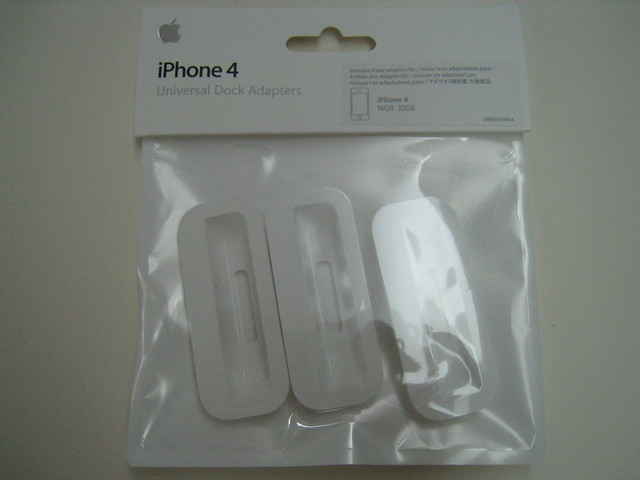
One day I was browsing iPhone 4′s accessories on Apple Singapore Online Store and to my surprise they are selling the Apple iPhone 4 Universal Dock Adapter for SGD$14 and of course, I immediately bought it.

Today, I received the adapters and out of curiosity, I did a search for iphone dock adapter in the store and it seems they are selling the iPhone 3G/3GS Universal Dock Adapter now as well.


Packaging Front View


iPhone 4 Dock Adapter


Labelled as 19 (iPhone 3G/3GS Adapter is 15)


iPhone 4 Adapter (Top), iPhone 3G/3GS Adapter (Bottom)

Friday, 29th January 2010Friday, 29th January 2010
Posted by Lester Chan at 00:00 in Review

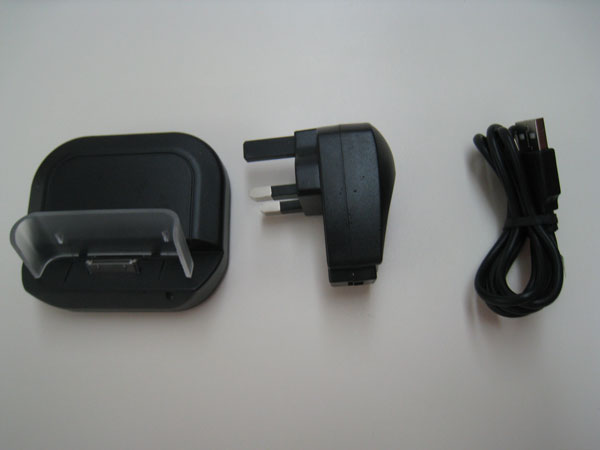
Received my Apple iPhone 3GS / 3G USB Desktop Sync & Charge Cradle from MobileFun yesterday. It is a good alternative to the Apple iPhone 3G Dock (£22) and Apple Universal Dock (£36) because it cost only £9.99 and it works exactly the same.


Box Contents

It comes with the cradle, the MiniUSB to USB cable and the charger head.


Charger Head


Cradle – Front View


Cradle – Back View

You can either charge and sync your iPhone 3G/3Gs with the cradle by connecting the USB cable to your computer or just choose to charge your iPhone 3G/3GS by connecting the charger head to a power outlet.


Cradle With iPhone 3GS – Front View

There is a blue LED light on the right side of the cradle to indicate that there is power coming to the cradle.


Cradle With iPhone 3GS – Side View

As you can see, my iPhone 3GS fits perfectly into the cradle and I like the plastic backing because it is pretty high and give the iPhone a pretty good back support. That is important to me because sometimes I type on my iPhone while it is still docked in the cradle.

Most of the stuff on my table are black, my monitor, my television, my keyboard and even my mouse. The only white colored things around is my table itself and my Apple’s Universal Dock. This black cradle is perfect for all black iPhone users because it blends well with your black iPhone 3G/3GS and even the devices/gadgets on your table.

You can get the Apple iPhone 3GS / 3G USB Desktop Sync & Charge Cradle for £9.99 (including taxes but excluding shipping).

For more iPhone accessories, Check out Mobile Fun’s iPhone Accessories.

Wednesday, 7th October 2009Wednesday, 7th October 2009
Posted by Lester Chan at 21:53 in Battery

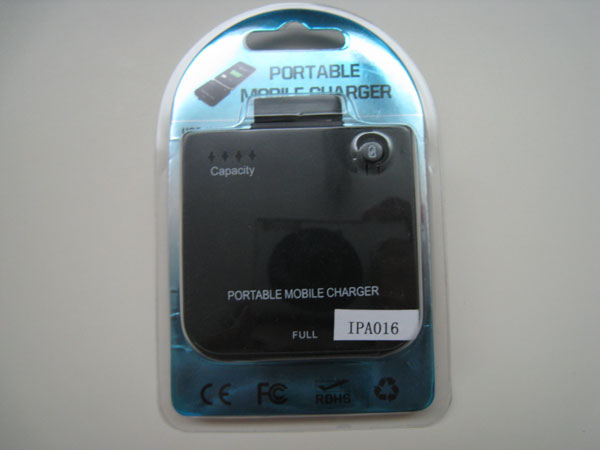
Got to know this really cheap external battery charger for iPhone 3G from Hardware Zone Forums. The seller, free-4-flying, is based in Hong Kong. Once in a while he will have a sale on that. The cheapest I saw is USD$6.99 but unfortunately when I bought that time it is USD$8.48 (SGD$11.87). The price stated includes shipping which makes it real cheap!

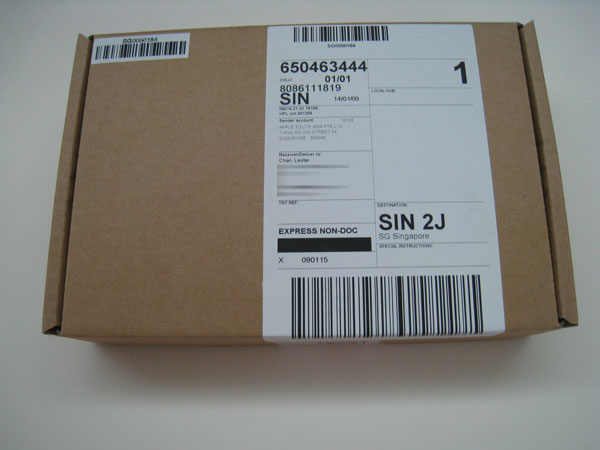
I bought it on the 18th September 2009 and it was shipped on the next day on 19th September 2009. Took 17 days to reach me, arrived in my mailbox yesterday on the 6th October 2009. This is technically the first item I purchased from eBay. The very first item I bought is the Apple Care for my MacBook Pro =D

Description

  • Light-weight, super-slim design to carry with your iPhone or iPod Conveniently charged via any USB ports
  • High-capacity, rechargeable lithium-ion battery
  • LED indicator for battery power level
  • No memory effect, Li-ion battery built-in

Specifications

  • Battery Type: Lithium-ion battery
  • Capacity: 1900MAH
  • Rated input: 5V 800mA
  • Rated Output: 5V 500mA max
  • Charge time: Around 2 hours
  • Dimension: 67x62x15 (mm)
  • Color: Black

Compatibility

  • iPhone 3GS 16GB/32GB
  • iPhone 3G 8GB/16GB
  • iPhone 4GB 8GB 16GB
  • iPod Touch
  • iPod Nano
  • iPod Classic
  • iPod Video


Packaging – Front View


Packaging – backView


Front View


Back View


Input


Output

Wednesday, 12th August 2009Wednesday, 12th August 2009
Posted by Lester Chan at 22:58 in Gadget

Before I start this tutorial, I would like to give full credits to crimsontwo from xSellize forums and joshua.menke from cocoaforge. I merely improve on crimsontwo’s work.

In the thread, Gmail + push on iPhone w/ Prowl on xSellize forums, crimsontwo gave instructions on how to run the Prowl python script on your iphone. The downside to it is that if your iPhone connection change from EDGE to 3G or 3G to Wifi or any vice versa, the script will be disconnected from Gmail. To solve this problem, he recommends you to upload the script to your own web server instead.

You need to have SSH access to your web server as well as Python installed in your web server which is not covered in this tutorial.

So here we go:

  1. Get Prowl from App Store for USD$2.99
  2. Register your Prowl account at http://prowl.weks.net/register.php
  3. Once registered, click on Settings Tab
  4. Under API key, click on Generate API Key Button and note copy down your generated API Key
  5. Download the required files in a zip, called, Gmail With Push On iPhone Using Prowl
  6. Using WinZip, extract the zip file which you have downloaded from Step 5
  7. You should see a folder called gmail_and_prowl
  8. Open the file main.py using NotePad or WordPad
  9. You should see these lines on line 11 to 13:

    prowl_apikey = “your_prowl_api_key”
    IMAP_USERNAME = “your_gmail_username”
    IMAP_PASSWORD = “your_gmail_password”

  10. Replace the text your_prowl_api_key, your_gmail_username and your_gmail_password accordingly and save it
  11. Using your FTP, upload the folder gmail_and_prowl to your home directory in your webserver
  12. Login using SSH and browse to the path where you uploaded gmail_and_prowl, for example, /home/username/gmail_and_prowl/
  13. Type this command:

    nohup python main.py > /dev/null 2>&1 &

  14. The PID of the process which is executing the script will be displayed. You may want to know that number down, just in case you need to kill the process.
  15. You can now log out from the SSH and send a test email to your Gmail account
Saturday, 11th July 2009Saturday, 11th July 2009
Posted by Lester Chan at 15:36 in Event, Gadget

I was there last year at the Singtel iPhone 3G Launch queuing up for the iPhone 3G as a normal consumer. This year I was also there, but with a media pass. I was there pretty early at about 1.30pm because I have to go to Funan to run some errands. The media event started at about 3.30pm. We are brought around the Comcenter by Yuen Kuan Moon, the EVP of Consumer from Singtel. He explains to us the various part of the queue structure and how the customers will move about when queuing. Apart from that, Singtel announced a new service called Mio TV on Mobile. Customers can get to stream live tv stream from Channel 8, Channel News Asia, Bloomberg and a few others. It is not an iPhone App, but rather the streaming is done in Safari itself. It is pretty impressive as the quality is watchable and it doesn’t lag.

According to Kuan Moon, this year the response was much better than last year. He did not give an exact figure but he says in thousands. Last year the launch of iPhone 3G is basically register of interest and user still have to queue up. But this year, Singtel did a pre-order and require the customers to make a deposit of SGD$50 before queuing. There is also a separate queue for walk-in customers which closes at about 9pm due to the overwhelming response on the pre-order queue.

The event was not a midnight launch but rather only a 4 hour event from 8pm all the way to 12midnight. I have no idea whether they closes at 12midnight yesterday as from what I know at 9pm, the waiting time was 6 hours according to their website.

Similar to last year, the host this year was Glenn Ong from Class 95 as well. Mediacorp artists like Pierre Png, Joanna Peh, Felicia Chin was also there. Instead of the glass house which Singtel specially built for the iPhone 3G launch last year, this year they are using tentage. Also, there are tentage all over the queue area because some customers complained about being in the rain as last year when they are queuing up.

I used my Dad’s line and got my iPhone 3GS 32GB Black at SGD$678 on iFlexi Lite plan. I upgrade his Classic plan to iFlex Lite and got SGD$100 off, I got a SGD$120 Red Prestige voucher from my uncle and hence the iPhone 3GS price became SGD$678 – (SGD$100 + SGD$120) = SGD$458.

The only way to tell an iPhone 3G from iPhone 3GS is at the back. A1303 refers to iPhone 3GS and 32GB will definitely be a 3GS. Also the part the text it says iPhone is shiny for iPhone 3GS and white for iPhone 3G.

Facebook Gallery: Singtel iPhone 3GS Launch

Page 1 of 41234