Archives For Tag 'D-Link'Archives For Tag 'D-Link' Home » Blog » Tag » D-Link
You are browsing lesterchan.net blog archives page by tag 'D-Link'.
Tuesday, 6th September 2011Tuesday, 6th September 2011
Posted by Lester Chan at 09:02 in Hardware

Bought the D-Link DNS-320 (SGD$109) and 2x Western Digital 3.5″ SATA Caviar Black 1TB hard drive (SGD$115 each) at Comex 2011 last weekend.

I still bought back a D-Link NAS after my bad experience with D-Link DNS-323 because the DNS-320 is meant for my mom’s office and D-Link service center is just located behind my mom’s office in case anything happens.

I wanted to get the Synology DS211j instead but unfortunately it is out of my mom’s budget. I initially also wanted to get the Buffalo LinkStation Pro Duo, but after reading SmallNetBuilder’s review on it, I decided to give it a miss as the review was pretty bad.

The differences between DNS-320 and DNS-323 is quite significant. Now the hard disk is loaded via the top which makes it slightly easier to install as compared to front loading. The user interface has also been revamped and now it bares no resemblance to the usual orange/white/grey D-Link’s interface, it is a much welcomed change but it is a little laggy though. So far for NAS, I have not seen a better web interface than Synology’s DiskStation Manager (DSM).

For a more technical review, check out my friend, shadowandy, blog post entitled D-Link DNS-320 – Layman speed test.


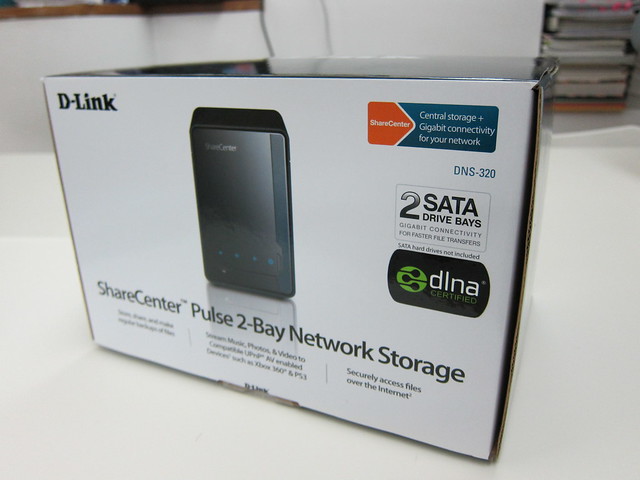
D-Link DNS-320 Box


Western Digital 3.5″ SATA Caviar Black 1TB


HDD Is Now Loaded Via The Top


DNS-320


Brand New User Interface

Tuesday, 2nd August 2011Tuesday, 2nd August 2011
Posted by Lester Chan at 23:12 in Hardware

Went to StarHub Shop at VivoCity on the 24th June 2011 to apply for MaxOnline Infinity which is Starhub fibre Internet service. I chose the MaxInfinity Elite plan which has a download speed of 150Mbps, upload speed of 75Mbps and international speed of 15Mbps. It cost SGD$82.18 per month for a 2 year contract.

They did not tell me when they are coming to setup the fibre Internet service. I waited a month and they called me on the 3rd week of July 2011 saying they will come on 26th July 2011 to install the service.

StarHub is forcing us to use the crappy Huawei HG256s Residential Gateway (RG) and there is no way to bypass it yet. I heard the wireless on it is just pure shitty. So the typical setup would be:

Terminal Point (TP) -> Optical Network Terminal (ONT) -> Residential Gateway (RG) -> Router

If order to get your router to do the routing you need to bridge the connection between the RG and Router.

Step 1: You need to disable WLAN and DHCP on the RG


Disable WLAN on RG


Disable DHCP on RG

Step 2: Enable DMZ on the RG


Enable DMZ on RG

My RG’s IP address is 192.168.2.1 and my router WAN Port is connected to my RG’s LAN Port 1 with WAN Static IP address set to 192.168.2.2 on the router.

My router IP address is 192.168.3.1.

RG (192.168.2.1) -> DMZ (192.168.2.2) WAN -> Router (192.168.3.1)

Step 3: Setting WAN Static IP on the Router


Setting WAN Static IP on Router


Router IP Setup

That is basically it. I have disabled all the firewall features on the RG side and let the router handle it. DDNS on the other hand is handled by the RG instead of the router.


DDNS on RG

Since the router is behind RG’s DMZ, port forwarding is handled by the router.


Port Forwarding on Router


BEFORE (Cable): Speedtest – MaxOnline Ultimate (100Mbps)


AFTER (Fibre): Speedtest – MaxOnline Inifnity Elite (150Mbps)

I am unable to obtain 150Mbps speed though. I am wondering if Speedtest can output more than 100Mbps. However I am able to obtain about 80Mbps on 2 computers while doing Speedtest simultaneously. I did my speedtest on StarHub’s Speedtest before doing it on Speedtest.net.

Upon further investigation, I am actually on 150Mbps, I downloaded a iPad 2 firmware update (iOS 4.3.5) from Apple and I am getting about 16MB/s to 18MB/s which is about 128Mbps to 144Mbps. Woot!

Credits
Thanks to MarineX for his post on HardwareZone Forums.

Thursday, 16th June 2011Thursday, 16th June 2011
Posted by Lester Chan at 09:35 in Hardware

On the night of the PC Show 2011, my brother called me and said the D-Link DGS-1008D (which I got back in IT Show 2009) switch in my room is spoilt and there is no power being supplied to it. Went back home, tested and verified that it is the case.

Went down the next day to PC Show 2011 again and got back the same switch, D-Link DGS-1008D switch, for SGD$85. I was expecting them to change the model number since it is totally a new design, but unfortunately it remains the same. This time I got 2 pieces instead of just 1 as I will be placing the additional switch in the living room to facilitate the switch to Fibre Internet.


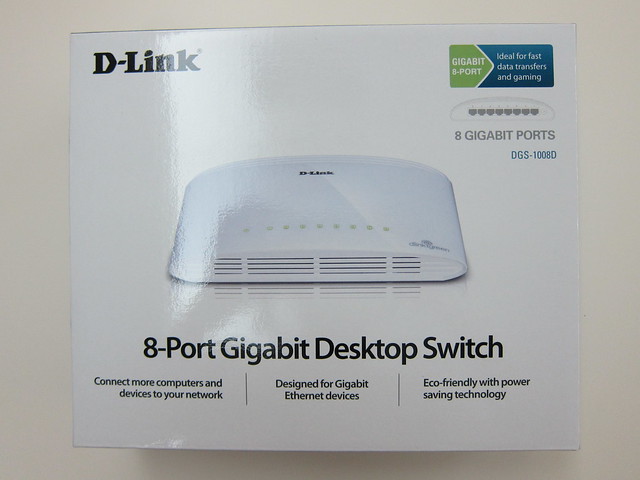
Box Front View


8 Ports


Switch In My Room


Switch In The Living Room

Tuesday, 19th January 2010Tuesday, 19th January 2010
Posted by Lester Chan at 00:00 in Blog, Hardware

I purchased my D-Link DNS-323 on the 1st September 2008 during Comex 2008.

3 days ago, my DNS-323 decided to give up on me, just after 1 year and 3 months! The warranty for the DNS-323 is only 1 year so my warranty had just ended! Argh!

I thought I might try my luck, I wrote in to D-Link saying I am a blogger blah blah blah and a huge fan of D-Link, spending SGD$519 worth of D-Link products during IT Show 2009 and to see if out of goodwill, they can RMA for me. But if it fails, at lest I tried and time to hoot a new NAS.

Here is what happen:

  • I found my DNS-323 switched off and immediately power it back on.
  • Works normally after powering it on, but after an hour, the DNS-323 disconnect itself from the network.
  • I tried powering it off and on again by pressing on the power button but to no avail.
  • I have to manually plug out the power cable and plug in back in again and press the power button to power it on.
  • Works normally again, but as usual, after an hour, it disconnect itself from the network again.
  • Power button still does not work, have to manually plug out and in the power cable to reboot it.
  • This time round, the power LED light blinks non-stop after booting up
  • I tried hard reset, swapping the harddisks, removing the harddisks, all could not work, the power light continue to blink.
  • I seek help from my friend, Andy, who is an expert with D-Link products, tried some of his method but still could not get the DNS-323 to hard reset

While waiting for D-Link to reply me, I did some research on 2-Bay NAS and have narrowed down to the following 4 choices which is within my budget.

SYNOLOGY Disk Station DS210j

Price: SGD$408
Official Link: SYNOLOGY Disk Station DS210j

QNAP TS-210

Price: SGD$514
Official Link: QNAP TS-210

NetGear ReadyNAS Duo (Diskless)

Price: SGD$429
Official Link: NetGear ReadyNAS Duo (Diskless)

Thecus N3200 Pro

Price: SGD$499
Official Link: Thecus N3200 Pro
Note: This is 3-Bay NAS, but I included it because it is within my budget.

The purpose of me using a NAS is to share files within my home network and to use it as a BitTorrent machine. I also backed up my files on it, so I will definitely run RAID1 with it. Any recommendations on which one I should settle for eventually? Please leave a comment. Thanks a lot!

Friday, 13th March 2009Friday, 13th March 2009
Posted by Lester Chan at 04:17 in Blog

Woke up at 10am today, left my house at 10.30am to Suntec City with my brother for the IT Show 2009. I decided to park at Marina Square instead of Suntec City to avoid jam at the carpark. Reach Marina Square before 11am, and still manage to eat McDonalds Breakfast.

After breakfast, immediately went to wait outside level 6 of the Suntec exhibition center. While waiting, there is this lady from MediaCorp Radio approaches us for interview. She talked to me in English first and then ask me whether I can do a Mandarin interview, I agreed since I got nothing to do. She ask some questions like what are you buying at the IT Show, how often you come to this type of fair and how much savings you can save. I am so handicapped in Mandarin. I have no idea how to translate laser, router, switch, wirless USB adapter to Mandarin!

Exactly at 12pm, the doors are opened and the security personnel got Zerg rushed! Went to the Ban Leong booth first as my brother wanted to take a look at Razor mouse as his is dying soon. As usual the promotion for Razer is nothing fantastic, I think you can get even cheaper outside for certain Razor products (eg: Lycosa Keyboard).

Went to the D-Link booth and asked if I buy above SGD$500 got discount, the sales guy said only if I pay cash he can give me 2% which I thought it is definitely not a good promotion at all. If I pay by credit card, I get free gifts as well as points! UOB is having some promotion, I think if you spend above a certain amount, they will give you some things free. I am aiming on the sure-win lucky dip if you spend more than SGD$850.

Damage at D-Link Booth

  • D-Link DIR-855: SGD$299
  • D-Link DGS-1008D: SGD$100
  • D-Link DWA-160: SGD$119
  • Total: SGD$518

After getting my networking stuffs, went to level 4 to Samsung booth to get my multifunction color laser printer. Saw Kelvin from Fuwell and Daniel’s Samsung colleague which I met at BlogOut! 2009. Fuwell is selling Samsung LCD Monitors whereas Harvey Norman is selling the Samsung printers. Samsung printers come with trolley but pushing the trolley though the crowd is no easy task! The printer box is quite bulky whereas the printer is quite small itself. The price for the CLX-3175N is still the same but this time instead of giving Abalone (during Chinese New Year promotion), they are giving a free black toner and you are entitled to buy additional toners at 20% off. Pretty good steal I would say.

Wanted to pay by UOB for my printer and toner but it got rejected! My mom literally max out every credit card when she is in Japan as well as for the down payment of the BMW. So end up paying with HSBC and there goes my sure-win lucky dip. Instead I got a SGD$5 Starbucks voucher for spending above SGD$350 for my UOB card. I kinda like the lucky draw form in IT Show 2009, every SGD$100 spend entitled you for one lucky draw form. I don’t really make an effort to get the lucky draw forms normally so I maybe a bit noob in this area. The lucky draw is carbonized, so you just have to write on 1 and it will be carbon copied to 4 other copies! Also the forms are short and sweet, just fill in your name, NRIC and contact number!

Damage at Samsung Booth

  • Samsung CLX-3175N: SGD$698
  • Samsung CLT-P409C: SGD$184 (Toner Value Pack)
  • Total: SGD$882

After buying all the stuffs that I set out to buy, we went home to put the stuff before my brother send me to school for my Statistics tutorial at 3pm to 4pm.


D-Link Networking Products + Samsung 3-in-1 Multifunction Color Laser Printer And Toner

After my tutorial, went to the IT Show again with Kelvin and Hong Jun. Kelvin went there and got a ViewSonic 24″ monitor with built-in speakers and he helped his girlfriend to get an iPod Nano (Black). Saw Rayman : Raving Rabbids for Xbox 360 at the PlayCraft booth and I immediately bought it! Finally there is a “family” game on my Xbox 360 besides Bomberman to play with Li Xiang. I wished that Raving Rabbids 2 will also be out on Xbox 360, but I think that will not be the case.


Rayman : Raving Rabbids For Xbox 360

Damage at Playcraft Booth

  • Rayman : Raving Rabbids (Xbox 360): SGD$49.90
  • Total: SGD$49.90

Saw from Hardware Zone that the Ovation booth are selling Western Digital internal harddisk, so went there to get 1TB Western Digital Green Power for Li Xiang, but it is out of stock and the stock will be coming in at about 7pm.

Instead of waiting there till 7pm, the three of us when for dinner at Marina Square food court. Hong Jun, my family and I Just love the curry noodle there! Met up with my secondary school friends there as well. When they came, Hong Jun and Kelvin went home.

After dinner, I went to the IT Show the third time within the same day and immediately went to buy Li Xiang harddisk. This time it is so crowded that I could not even make a call out when I am in the hall! It seems that the base station has been overloaded either that of my iPhone 3G sucked.

Li Xiang’s Damage at Ovation Booth

  • Western Digital Green Power (1TB): SGD$165
  • Total: SGD$165

I injected SGD$1,449.90, Li Xiang injected SGD$165 and Kelvin injected about SGD$600+ into Singapore’s economy!

Page 1 of 212